Showing posts with label byot. Show all posts

Wednesday, April 24, 2013

A #BYOTchat video featuring Brebeuf Jesuit Students

A submission for #BYOTchat. Thu, April 25th, 2013 at 9pm EST.
moderated by the ever-amazing @40ishoracle!

Come join in the fun!


Note: This was also my first opportunity to fill out a fair-use copyright claims dispute on youtube, so that was kind of fun.

Want more BYOT goodness? Our collection of Blogs, tools, FAQs, and more
Some of the images in here are a part of our pinterest collections
...and of course, you can always find JD and Jen on Twitter

Thursday, April 4, 2013

Competing for their Hearts and Minds -- #Digcit Thoughts from a RoadTrip Vacation

My wife and I are taking the family on one of those road trips that seem to be a necessary  rite of passage of raising-a-young-family that no one can explain. This post is a collection of reflections made on the journey -- Because you can take the #edtech geek out of the school, but you can't take the school out of the #edtech geek.

Different Tools, Different Data, Different Results
On day three of our journey, we are planning on driving from Atlanta, GA to Raleigh, NC. My wife has been referring to the 4.5 hr journey for a few days, but when talking to our relative in NC, she says it is closer to six hours. She says "But mapquest said it was 4 and a half."

I pull out my Nexus 7 and ask Google Now for a map to Raleigh: Six hours and 15 minutes.

My wife (annoyed): "But why would it change? I Googled it just a few days ago!"
Me (in interesting-conversation-about-tech-mode when I should have been in husband-consoling-wife-who-has-had-her-plans-derailed-mode): I thought you said you had used Mapquest?
Wife (now annoyed at me): I used something. Why would they be different?

...and while i could think of all sorts of reasons for differences including accuracy of routes, real-time information (those cool Google cars), differing calculation methods, real-time traffic or construction updates (not to mention any number of human error issues), I had picked up on the fact that this was NOT the conversation my vacation planner and mother of my children wanted to have...but it got me thinking.

The Information Conundrum
Waze Crowd-sourced mapping
What my wife experienced  is an increasingly common occurrence  People in stop-and-go traffic who pull up
a traditional GPS will often be frustrated by a red (slow) traffic line, but little information. But if that same person is using an app called WAZE, they can get minute-by-minute updates from real users, including the guy 2 miles ahead saying "they have the semi off the road now. traffic should start moving any minute." And while mapping and travel seem to be one of the easy highlights (Apple's early foray's into maps was well-documented as one of the companies few but often entertaining stumbles), there are a number of areas where we are beginning to see this issue arise for our students.

The internet houses websites and blogs galore which at first glance can appear to have valid information. However, as the ease of creating and distributing information has increased, we have not had a corresponding rise in our capacity as humans to filter through this information and distinguish bad information from good. And this is not just a situation created by the rise of the blogosphere.

Billboards and Displays of Competing World Views
As we are travelling down the highway on the way to Raleigh, I see a billboard that shows a caveman fighting/running from an old-style Tyrannosaurus Rex (you can tell older depictions from the positioning of the tail. If it drags on the ground Godzilla-style, its based on older anthropological models). It is an advertisement for a Creationist Museum - a concept I am familiar with due to our proximity to one in Kentucky -- I just didn't realize that they had franchised.

The newest creation museum advertising eliminates the "controversy"
in favor of the draw of Dinosaurs. Thunder lizards are cool.
There are currently 16 Creationist Museums. These museums are typically privately funded with a

combination of models, animatronic displays, professionally produced videos and interactive activities typical of the modern museum experience. In fact, the many of the museums get high reviews from visitors and have been featured as tourist destination highlights. What is noteworthy about these museums is that the exhibits are based on young-earth/creationism interpretations of the origin of life and the planet.
The "Come Meet Your Relatives" sign outside the
Mammal wing of the Museum of Natural History

Either the Earth is 4.54 Billion years old or it's 6,000 years old. Relativism, while popular as a moral stance (that will be a rant for another day), is not as easily applied to geology.

But thousands of people a year visit these museums that cost millions of dollars in order to learn from what National Center for Science Education director Eugene Scott called " the Creationist Disneyland". The discussion that ensued in the car-ride ranged from young-earth positions, to carbon dating, to evolution and catholic teaching. It led to one of our daughters pointing out the number of evolution references made at the Smithsonian Museum for Natural History (although the Gem displays were the biggest hit).

The point here is not good science vs. bad science. (see the original #savethedinosaurs post for some of that). There are two highly funded competing world views fueled by scientific method, research, religion, morality and money that are vying for the eyes, hearts, and minds of our students.

  • What are the specific skills that students need to develop in order to function in this world of competing information and data?
  • Regardless of the status of the Common Core and its corporate sponsored testing offspring, what should schools be doing to put in place the development of these skills and habits-of-mind? 
  • At what age do our students have to develop the capacity to use their skills and capacity for rational thought to determine which of these world views they will subscribe to and follow?

#Edtech, #Digcit, and #BYOT -- Identifying the Essential Skills
1. Claim and Analysis: Students must be able to find factual claims within a piece of writing, be it a tweet, Facebook vanity card, news article, or research paper. They should be able to identify and evaluate the supporting evidence (or in most cases lack thereof) which supports the claim.

Practically Applied: We use the student newspaper. Preliminary questions we ask are:

  • Do you trust this source? 
  • What reasons do you have in-source for this trust? 
  • What reasons do you have beyond the source for this trust?


2. Identifying Assumptions: World views are loaded with assumptions of truth. Identifying these assumptions and treating them as claims that can also be analyzed for support is a key activity in the high-data, conflicting conclusion modern age. The process of uncovering assumptions can be difficult to teach/learn, in part because human brains use assumptions to process data efficiently in the best of situations (and with all of the data produced in the world today, it is NOT the best of situations.

Practically Applied: Use a series of regressive questions as part of the research process when students are beginning to identify primary research questions and problems:

  • What is the problem that you have identified?
  • Why is that a problem?
  • What information do you need to formulate a solution?
  • What sources can provide that information?
  • Are there experts in the area who believe that it is not a problem?
  • What are their reasons for believing it is not a problem?


3. Closed Systems of Information, Silo Thinking, and Confirmation Bias: The goals of hardware, software, and information providers in the modern business-oriented world is lock-in. This is the tendency to go to the same well for information and solutions. Again, this is an aspect of human nature - habits help solve recurring problems efficiently. Thus, Google wants you to constantly go to its website for the answer. Apple and Amazon are both creating stores of information and data access so that you never have to go to the Big-G for an answer. Fox, MSNBC, CNN are all competing for your eyeballs, your homepage, your attention and your trust. As you spend more time within one system, you find that the answers reinforce eachother on two levels: All of the answers seem to tie together, painting a coherent view of reality and all indications then seem that this source of information is a good source to rely upon in the future.

Practically Applied: Teach social media as a tool and not a distraction. Students should be working from a young age to a) question the reliability of information sources and b) build a system of information sources that intentionally have multiple viewpoints, biases, and information.

An early social network activity we use is to identify social media sources within a student's personal network. Count the number of friends, relatives, celebrities, news sources. Then rank those sources along different perspectives such as politics (conservative/liberal, Big/Small government), religious perspective, value of formal education, etc. Many of our students find that they are likely to have a network that feeds their own pre-existing world view and that the ideas presented are strikingly similar across social media.


4. Variety of Tools and Sources. An unanticipated side-effect of the 1:1 BYOT implementation at the school is the in-depth discussions about methodology, whether it is for creating a presentation or finding information. In a world where each student brings a device and the device is the choice of the family/student, there are a lot of tools in each classroom. Students begin to discuss and share problem-solving strategies naturally and teachers can foster this sharing with directed activities.

Practically Applied: Focus on process over product. Have students keep a process journal as part of each major assignment. Use the journal as a part of reflective and sharing activities. As different conclusions are reached, the student's become better equipped to un-pack how they reached a specific answer and why that answer was different from the conclusion of another member of the class.

On Reflection
None of these applications are easy and very few of them can be answered with a click or a filled-in bubble.We have found that the amount of time we spend on individual projects grows as we add in time to use regressive questioning in the beginning and time to pair-and-share process reflections in the drafting stage of papers and presentations.

But this is a part of the answer to the issue of information overload and over-reliance on data-without-depth.

Our call as educators is to helps student identify not just the correct answers to the questions on a test but the underlying systems that produced those questions-and-answers in the first place. Corporations  governments, and organizations are all to willing to have reliable consumers and followers.

We should accept nothing less than independent thinkers.
Our children deserve it.


More than just a consumer and political pawn

Wednesday, March 27, 2013

When it is OK to say "NO" - An Twitter-based #edtech Reflection about IWBs

Today's post comes out of a conversation that happened out of a twitter chat that caused me to do a lot of reflection on whether or not my responses were a) appropriate or b) contradictory to many of the "Rules" that I laid out in my post from a few weeks ago (note: "10 Rules for a Successful #Edtech Department that have Little to do with Technology" is now the 3rd most popular post on this blog all-time -- thx)

Context: How Twitter Got me to this Topic
The premise put forth by @edtechempowers (Educational Researcher in Canada and great conversationalist), originally posted this comment:
Through the course of our conversation, it became apparent, that while he and I agreed about a number of things in the use of technology and the running of an IT department, he had little context for a technology department that is build around student learning, school mission, and teacher support.
This discussion continued the next day, as we outlined the difference between a collaborative tech department vs. one which is adversarial:

Again, the conversation was more about a frame of reference for a different kind of technology program than a fundamental disagreement about technology or programs. Where the discussion got interesting was when we talked about specific tools and the role of IT in determining use.

Then we started talking about SMARTBoards...

END CONTEXT

A Topic for Discussion -- The Interactive White Board (IWB)
Many of you know that I am not a huge fan of Interactive White Boards

Background
I was given a whiteboard in my second year of teaching and had a blast discovering interesting ways to use it (my favorite was using the interactive pens to show specific cinematography choices while deconstructing Shakespeare movies).

When I became the Head Geek of Brebeuf Jesuit, I was in favor of installing IWBs as part of our build-out. We hedged our bets a little by only putting the boards in 1/3 of the classrooms -- technology moves so fast that we didn't want all our technological eggs in one basket.

We put forth a lot of training efforts -- more traditional than our flexible model now -- but with a lot of teaming opportunities, modeling of creative ways to implement, and idea sharing.

One year later, while generally disappointed in implementation  we approved a SMARTBoard-in-every-math-room proposal to respond to competition and because of the use-case presented by the teachers. After two years of training, implementation, and reflection we found that:
  • The most common use for a SMARTBOARD was as a screen.
  • The most common "interactive" use for a SMARTBOARD was as a mouse.
  • The most common response after "do not use" regarding the digital "markers" was "I occasionally circle or underline something" (A common reason written in for why it was not used more was "I just forget")
  • There was little use of screen-shading, use of SMARTNotebook or other templates, or any features that would make it a more student-centered activity.
We finally determined that there were two teachers effectively using the SMARTBoard: one teacher had converted most lectures to a SMART format that would allow the teacher (and in some cases, students) to fill in sample problems using the inking feature and another teacher had a variety of student-based activities including puzzles, word searches, "races" etc.

After another attempt to "spread the word" on these techniques and offer more individualized PD, we as an IT department made the preliminary decision to quit buying Interactive Whiteboards. This was discussed with Academic Department chairs and we closed the book.
  • Follow-up 1: Teachers still wanted to be able to provide classroom interactive notes electronically.
    The most common use of our IWB - with Donuts
    and BatMonkey via @40ishoracle
    We found using a pen-based tablet PC, classroom computer, and UltraVNC (free software) adequately did the job -- for less money than a SMARTBoard.
  • Follow-up 2: 2 years later, a teacher commented on a constituent survey regarding the IT department -- "When am I getting MY SMARTBoard?" -- it was anonymous. Communication Fail.
  • Follow-up 3: 4 years later, we purchased an ENO board for our Teacher Resource Room. It is an excellent magnetic whiteboard. Each time we think "ooh. we could use the pen!", the computer has been re-imaged and does not have the software. Now we just take pictures of the board -- like the students.

The Challenge: Is It Ever OK for a Tech Department to Just Say "NO"?
Ouch. Talk about hitting me where it hurts. We are a 1:1 BYOT school. To argue that denying access to an IWB is a violation of our general premise of Access, Evaluate, and Use really caused me to pause. As we begin to gear up for the next capital project, a major renovation of classrooms, were we turning a blind-eye toward technology that could be used because of our bias?

JD's 3 Rules for When It is OK to Say "No"
(with an Two Important Corollaries): 


1. The primary method of evaluating classroom technology should be impact on Student Learning (Secondary, impact on teacher productivity).

When we developed our informal walk-through evaluation system for teachers, we placed a strong focus on "what are the students doing?". The activity of the students: collaborating, note-taking, reflecting, board races, presentations, etc. are one major focus of our environment. We should encourage techniques, tools, and behaviors that enhance student learning and discourage the same when it takes away from learning.


2. The metric for student learning should be informed by the teaching methods, student context, and objectives of the school's mission
School's have personalities that are based in part on the mission and culture of the institution. In a Jesuit school, there is a heavy focus on student-teacher relationship (an understanding of student context, a trusting and caring atmosphere) and the time and space to reflect on new experiences. If a tool or technique does not provide substantive new experiences or new ways for each individual student to reflect, then the tool runs counter to the mission and should not be adopted (it is for this reason that many of our school consultations begin, not with a "state of technology" report but with an analysis of a school's context and mission).

One of our Biology teacher's put it succinctly, "Even if you have a great interactive student-centered lesson for the SMARTBoard, it's still only one student at a time. I need more efficiency in class."


3. Because there are limited resources to buy technology, time to spend with students, and opportunities for learning experiences and reflection, some technology should be discouraged or avoided - even if it "could be good".

Ultimately, decisions have to be made on a global level. Will every classroom have a projector? a document camera? an IWB? a textbook? a computer along the back wall? a tablet in each student's hand?

Once decisions are made about the impact of a particular technology on student-learning within the context of the school's pedagogy and mission, then choices must be made about universal classroom technology. These choices can be upsetting to some teachers, but if the decisions are made out of student-impact and mission, the conversation, while painful can be authentic and even a good thing.


Corollary 1: The Admin Variation -- It is important to understand that the determinations described above are seldom in the realm-of-care of most tech.staff in an IT department. This is the realm of the Principal, the Academic/Curriculum leaders, and the Educational Technology integrators -- that includes teachers! A decision to eliminate a technology tool or to stop pursuing a path should be one of academics in all but the rarest of occasions (I am picturing a bizarre conversation regarding "we need to stop filtering for viruses because of the following academic benefits...")


Corollary 2: The Open-to-Growth Exception -- Decisions made across the board should be open to variations based on effective teaching and student impact. Just as the initial evaluation of a tool is based on the use-case and real data, the unique implementation in a classroom may be an exception to the rule. I have told the two teacher's described above that they will have the last two functional SMARTBoard in the building. They have found an effective use-case that goes beyond the typical implementation of IWB-as-oversized-mouse-for-the-teacher. Their unique use-case justifies technology that may not be used anywhere else in the building.

In the same way that pilot programs can be used to build a case for new technology in a school, an effective IT/Administrative Team will be open to finding the exceptions in policy that allow for an individual teacher to leverage technology effectively in a way that other educators were unable to do.

So there you have it. Even the most open-to-ideas, student/teacher centered program can still reject an idea or tool or technology.

Sometimes.


Friday, March 22, 2013

Answering "What's Next?" - Classroom Technology Beyond BYOT (with pictures and bullet-points)

One of the problems with pulling off an important (if small) Educational Technology revolution is the inevitable questions from excited faculty, students, and trustees: "What's Next?" While the temptation is strong to answer, "reading some comic books and 3-starring every level of Angry Birds", that is not acceptable and probably not good for student learning.

Thus, we began to embark on our next level of technology integration: What should a classroom look like in a BYOT environment.

We began in similar fashion to what eventually became our 1:1 BYOT solution -- we asked the teachers and students:

1. What is the most frustrating thing about teaching and learning in your classroom right now?
2. What would make you a more effective educator if we gave it to you next year?
3. What would the ideal learning environment look like?

And boy did we get answers!

Flexibility:
Whether it was from teacher-teacher or from activity-to-activity, teachers wanted the ability to change the layout of a classroom quickly, without a lot of effort. This came from Social Studies (Harkness table configuration with Primary Source discussion), World Language (quick changes from pairing to small groups to teacher-centered instruction and back again within the same period), to Math (we like our rows, but it would be nice if we could get in between them faster without tripping over bags -- you have to stay mobile when ever kid has a device).

Collaboration:
While the standardized testing advocates get a giddy little thrill every time they release a document that pretends learning is an isolated experience between the student and the electronic equivalent of a bubble sheet, learning is about engagement -- engagement with material, engagement with the teacher, engagement with each other. Teachers and students alike wanted a classroom where collaboration did not feel like a tacked-on after thought.

Space to Write, Tools to Share
Who needs an Interactive Whiteboard? Just give us colors!
After flexibility, the number one request was MORE WHITEBOARD SPACE. Three walls, paint the walls with whiteboard paint, get individual boards around the room. -- It was really a dream come true for a whiteboard aficionado like myself (totally had to look up that spelling).

As teachers begin to move from experience to reflection, sometimes the process of sharing that reflection is best written down where others can see (Think-Pair-Share and Gallery Walks are good examples of this). As the front of the classroom diminishes and students take more ownership in the classroom, a natural outgrowth of this is the need for more surface area capable of capturing ideas.

...and then there is technology
Ever try to have a beyond 1:1 discussion about technology with the interwebs? It is NOT pretty. It quickly degenerates into camps based on Android or iOS, or it becomes "Walls? Where we're going, we don't need walls!" from the blended-distance learning camps.

So here is our context:
  • We already start with learning objectives and student engagement in mind. Technology is a tool that gets us to stronger relationships, better (read more authentic) experiences, and opportunities to engage in personal and collaborative reflection (what Jesuits call LEARNING).
  • We already have a device in each student's hands and the device is one that they chose based on personal experience, reflection, and context.
  • We are working to create a learning environment that is flexible and student centered, focusing on the learning activities that maximize our mission and pedagogy.
Our thoughts so far:

  • Maximize flexibility and sharing with Multiple Displays and Student Device Connections
  • Create simple control systems that allow teachers and student to quickly do what they want
  • When possible, hide wires and connections and make the systems tamper-proof
  • Use Document Cameras and Classroom Recording technology to make access to notes and activities flexible in time and space.
  • Even when items must be fixed for electricity or network, give a teacher the option to clear the space for other activities

Our Teacher Resrouce Room -
Brainstorming Central
Over the next few weeks, teachers will begin to give feedback on the tools that they would like to see in their classroom and we will begin the process of designing our next generation BYOT classrooms. Feel free to peruse the document below. We will be hanging it in our Teacher Resource Center for discussion and feedback and finalizing the look and feel of our next iteration of the classroom.


  • What did we miss?
  • What do you like?
  • What will transform teaching and learning in your classroom AFTER you are 1:1?
  • What are the goals that you have in mind when considering classroom technology?

Feel free to leave comments down below or on social media. We appreciate the feedback and will use it in our decision making process (which the Jesuits call Discernment - they have a word for EVERYTHING)


Tuesday, March 19, 2013

Gadget talk: A Windows 8 Tablet Review - an #edtech perspective

One of the basic things that the IT department has to do at our school is play with toys (yay!). Since we are a 1:1 BYOT school, we are often testing devices to see a) how well they work in our environment (the network, the classrooms, etc.), b) whether they are worth recommending to partents, and c) what we need to know when there are problems.

My latest test was the ASUS VivoTab SMART. I first saw this tablet at #FETC13 and was very intrigued with it for a number of reasons:

VivoTab SMART w/ Transleeve Keyboard

  1. Full Windows 8 - none of the RT Only stuff*
  2. Really thin and light - made my ASUS Transformer Prime seem a bit heavy
  3. I'm a fan of the ASUS Brand - My favorite miniTab is my nexus 7 (which i carry around regularly despite having a Galaxy Note "phablet") and the aforementioned Transformer Prime (which i dutifully carried around before realizing that I only used it to read comic books).
  4. The 64gb version of the tablet comes in under 500 dollars. the Transleeve keyboard and cover add an additional $125. So for a little more than an iPad you get a full windows computer, in a tablet, with a keyboard -- color me intrigued (it's kind of a dusty purple color).
* Ok, for the non-geeks out there. Windows 8 comes in two (ok, three) flavors. The full version of Windows 8 has the familiar desktop and apps but ALSO has a tablet-style interface which is called RT. There are also tablets that strip out the Windows Desktop portion and only have the tablet stylings and tablet-specific Apps. These are RT tablets. -- To be continued

Origami folding cover w/ incredibly thin bluetooth keybaord
Since I am not yet famous enough to have companies throwing their wares at me for review (what is UP with that?), I had to find one on my own. As is the case with most ASUS products, finding the device proved simpler than finding the Keyboard/Cover combination that makes this unit really appealing. Once I had the product in hand, I put away my beloved Samsung Chromebook and dedicated myself to using the VivoTab as my primary device for four weeks. I made it about 3.

Rather than give a lengthy play-by-play review of Window 8, the interface, the hardware, etc., I am going to try to keep this focused on a few basic themes that I think will be relevant to educators and other users curious about the Windows 8 tablet environment. 

Windows 8, the RT Interface, Oh My
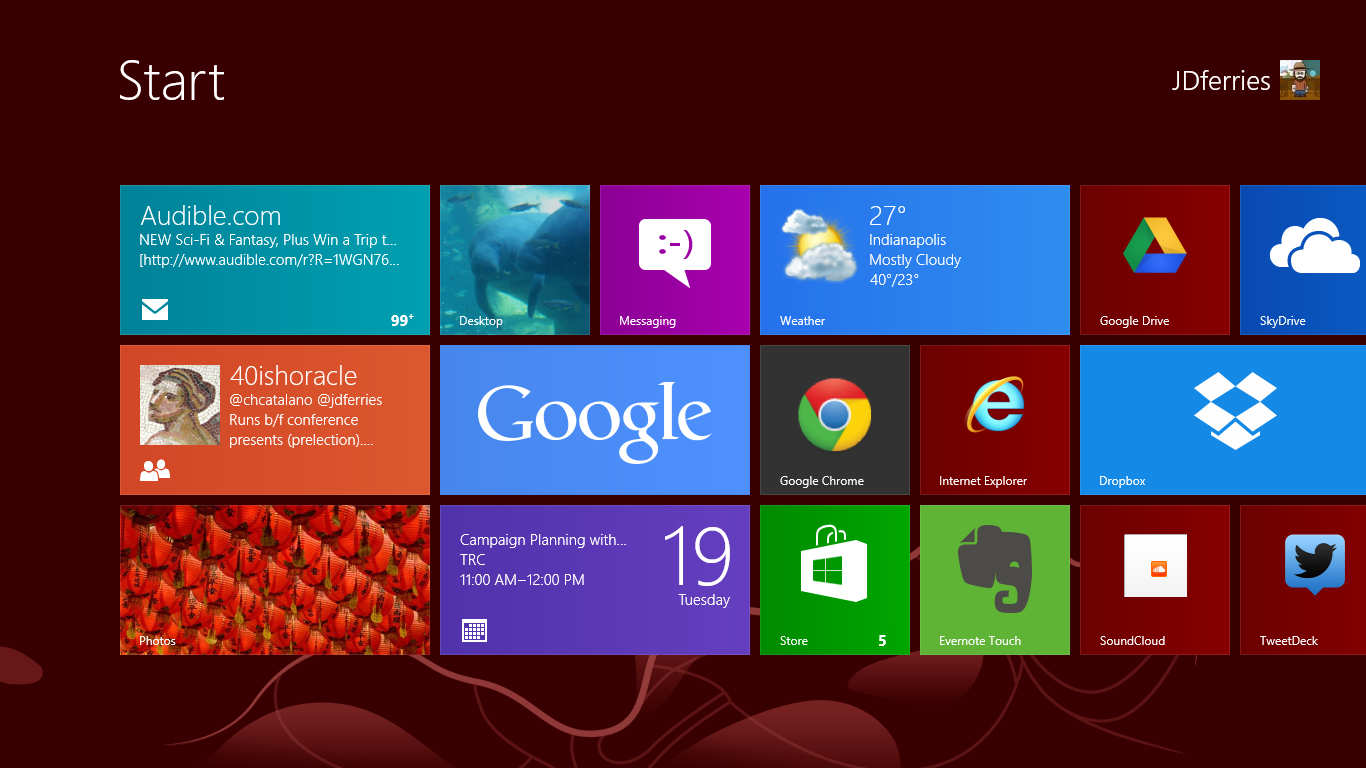
A new "Start"  interface for selecting programs
There has been a lot written about the confusion that is inevitable with the Windows Desktop vs. the Windows RT environment. How will normal human beings every be able to cope? We have a number of our teachers who have requested the Windows 8 upgrade and, I am pleased to report, learning is still taking place.

PD Tip: think of the RT interface as a very fancy START button (this is easy, since one of the ways to access the RT screen is to hold your mouse in the bottom left corner).

From this screen, you can access a variety of Apps and a market place to add more. Some of them, such as the People App, Photo App, and the Mail App are live tiles that rotate with updates of recent posts, pictures, subjects. All of these apps tie-in with major email programs and social networks. In addition to the apps on the RT side, you can create shortcuts for frequent websites and buttons for frequently used programs (I made a group of tiles for the full MS Office, a tile for tweetdeck, etc.)

A press of the desktop app and you are at a classic windows screen complete with file folders, "my documents", all the classic programs, etc. 

The "Killer" Feature: It's Windows - Full Windows - On a Tablet
I cannot stress this enough. You have a full version of Windows. In a package that is as light and portable as a tablet. Need to screencast using camtasia? - you can. Need a heavy duty word processor? - it can be installed. The first night I was using the computer I was getting ready for a hashtag chat and realized that I hadn't looked for a decent twitter app yet. "Oh. Wait. I can just install Tweetdeck!" 

Having worked with students in our 1:1 BYOT environment for almost a year now, the strongest cases of buyer's remorse come from tablet users who love the design but want more power, fuller programs, etc. As I look to the future, I am somewhat reminded of the early days of netbooks. While netbooks started with Linux and Android, and custom software, eventually, Windows became the dominant operating system. There is just something about a full-feature OS that is part of a regular workflow, be it for a student or teacher. Add to this the ability to break out of an app walled-garden and install full versions of software and you have a lot of potential. I saw jaws drop when teachers noticed that i was taking attendance on our windows-only web-based gradebook from a tablet.

...But it's a Tablet - A very early Tablet
There is an incubation period with all tablets. When the iPad debuted, it was months before people really started to figure out what to do with the real-estate. When I bought my first Android phone (a Nextel phone that was still using Cupcake while all of my friends were eating Froyo). I remember thinking that it had 80% of what I was looking for on a phone but was nowhere near the maturity that I had imagined.

A big finger must for non-touch apps
Switching from a Nexus 7 (running Jellybean) to the Windows RT side, I am forced back into the nascent incubation stage where developers and manufacturer are waiting to see if the product is worth the investment.

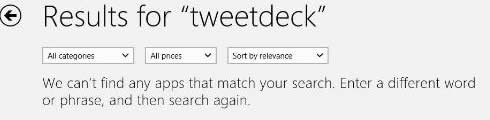
Up until last week, there was no Twitter app for the Windows RT side of the tablet. While it was wonderful being able to install tweetdeck, the interface is not optimized for touch. This meant either using the keyboard (not bad for chats, but annoying for quick tweets) or constantly trying to use my finger to scroll up by aiming for that way-too-thin scroll bar (it was frustrating enough that I bought a Wacom Bamboo pen - that is a handy little device).

I was constantly running into things that were either not-ready-for-primetime (the evernote app, while present has a very constrained feel compared to the more mature apps on the other mobile platforms) or non-existent (a quick photo editor, messenger app such as gtalk or Kik, Instagram, Pinterest, good RSS reader, etc.). Some of this is a result of market issues - Google is playing coy with the interface, creating a search app and a chrome browser, but not RT versions of other major products. Part of this is the wait-and-see. Regardless, for those used to full feature tablets on either side of the ShinyFruit-CuteRobot divide, they will have some frustration.

Design - It's All about the Use Case
In some ways, everything about the VivoTab that I liked in Florida is absolutely dead-on. It is light and thin and easy to hold and feels very natural in my hand. It is as comfortable as any 10" tablet when I fire up the Comixology App and settle in to see how Batman reacts to the death of Robin (spoiler alert: not well).

There is not comfortable way to do this
But the devil, particularly in design, is in the details. A primary use case for me is to take notes and live-tweet during presentations, keynotes, meetings, etc. I can comfortably do this on my chromebook and on my transformer prime. It is nearly impossible for me to do this comfortably on the VivoTab. There is a minimum amount of surface area required for a device to rest comfortably on a lap. The Microsoft Surface pulls this off by using a kickstand and a magnetic attachment to the keyboard (we tried it, MS naysayers). Because the VivoTab keyboard does not attach to the device, you have very little surface area with which to work. So you end up using the onscreen keyboard (which is not bad, but its no SwiftKey) or you end up with some awkward positioning (see photo).

My best #FETC Swag - Avid AE-36
One presumed must-have in a Windows computer is a USB port. I was surprised when I went to start a Google+ Hangout that there is no full USB port, thus no USB headphones and no wireless mouse with micro-USB dongle -- both things that I would have made part of my regular use case. Luckily, my Avid headphones (another #FETC find) worked great by maximizing the Input/Output Combo port work like a charm.

Final Thoughts -- The Race is On
oh so portable. Keyboard
magnetically stored inside cover
I think that many parents and students, given the choice between a mobile tablet OS and the potential of a full-function machine will find full-Windows 8 tablets very appealing. While they will have to be careful to think through design and power choices (for example, ASUS is about to release a larger VivoTab that will have a high-res screen, a keyboard identical to the Transformer (with spare battery and full attachment), and a digitzing stylus to boot, there is something very appealing about having one device that does it all.

But essential to the tablet experience will be the tablet-side of the OS, namely RT. While it is wonderful to be able to open a full OS and have programs on there that I cannot access in iOS or Android, sometimes a user just wants a tablet...and a tablet is only as good as its apps. All too often, there are no results or, even worse, 3rd party crap-ware that claims to do that which it does not do (there are SO many "instragram viewers" that just link to the website). Without a satisfying tablet experience (particularly as so many people have not had a good app experience from Google&Co. or Apple), the Windows 8 advantage will be overshadowed by dissatisfaction.
I started to dread the "no apps" screen

So I see this as a race. Can Microsoft entice developers and upgrade the RT experience fast enough to be comparable with its competitors? If it can, the current "full OS experience" advantage is a huge boost, particularly if the prices stay competitive. But the pressure is on.
  • Because each day, more and more people are realizing that a "tablet" experience, while limited, can fulfill most of their day-to-day needs.
  • Because the ChromeOS experiment is bearing fruit and the winds of change are forecast the merging of ChromeOS with Android (oooh a chromeOS tablet).
  • Because the not-so-hidden cost of a full OS is the price of programs (Office and Camtasia are wonderful, but they are not a $1.99 in the App Store). Consumer realize this.
For schools and educators and students, these products have the potential to be very appealing. But I believe that the current RT/App experience is enough of a drawback that it does not make up for the ultraportability of the form factor.

And if you are curious, I am glad to be back on my Chromebook
(and carrying my nexus 7 for tablet needs).

Have other questions? Different experiences or thoughts? Share them down below or hit me up on social media -- I'm around :)


Tuesday, March 5, 2013

Ten Rules for a Successful #edtech program that have little to do with technology

Zooming out to see the big picture:
The @40ishoracle and I have spent a lot of time travelling and talking about BYOT and Digital Citizenship, and professional development techniques (including free coffee, comfy chairs and Twitter chats). In the last few trips, we have been asked to modify some of our presentations to focus on something that we constantly touch, but very seldom present on specifically: How did we get ourselves into the position as a school to be able to do some of the cool things that we have done?

It's an intriguing question, particularly as a school that went 1:1 BYOT but often recommends other solutions for schools based on their mission, school population, infrastructure and student needs. The more I thought about it from the head-geek standpoint, the more I realized that, while there is not one-size-fits all magic device or magic LMS...That doesn't mean that there aren't some nearly universal mindsets that will help a Information Technology department work effectively within a school and in partnership with teachers and students to make learning awesome. Thus, I humbly submit:

JD's Ten (or so) Rules of a Technology Department that have Very Little to DO with Technology!
(Ta-da!)


1. Form Relationships

The six months that I spent at Brebeuf Jesuit was an interesting time for me. I was hired to make significant changes in the way that educational technology was used in the classroom and the school and some administrators were waiting for me to wave the magic wand.

The Teacher Resource Room is one key to keeping the
conversation going about tech and education
They became frustrated because I spent most of my days walking around the school, watching classes, having conversations with teachers. I was learning about the school, its mission, and its people. While this is difficult and draining for severe introvert, it was the key to identifying problems (with the computer networks and the human-communication ones), beginning to plan, and getting people to see what was possible. Ten years later, this basic maxim is still true. The most important network the technology department can have are the teachers who leverage the technology and the students who use it as an extension of their being.

Practically applied: We created a space for teachers to meet, gather and plan called the Teacher Resource Room. We stock it with free coffee, bring in donuts on Thursday, and use it for informal gatherings, idea sharing (the brown-bag lunch), and brainstorming (whiteboards!).

2. Find People and Processes to Bridge the Gaps

This nameplate sits on @40ishoracle's Desk
The most important role in a school that wants to expand its educational technology program is the #edtech coordinator. This role became so vital in our school that when it became time to reorganize the Principal's office the natural person to help with faculty development, evaluation, and curriculum was the #edtech who had been informally doing that job for five years.

The key to the #edtech role is not based on an expansive knowledge of educational gadgetry or lists of links to include on the ubiquitous "Website Wednesday" Newsletter. The best #edtech is an educator who is capable of discussing learning objectives with teachers and then translating those objectives and dreams into concrete work orders that can be understood by techs. They serve as the bridge between two very different types of personalities (for a tongue-in-cheek look at Tech-Geek and Teach-Geek personalities, check out this post).

Practically Applied: Processes can also help to alleviate tensions between the classroom and the technology-cave. One simple method that has immediate impact is a triage system of tech issues that prioritizes classroom issues. If teachers have confidence that issues in the classroom are going to be solved quickly, they are more likely to devote class time to integrate technology.


3. Start with Learning Objectives 
Our BYOT reflections during "Boot Camps" began
with learning objectives, not tools
Want a quick test to see if a the latest cool new thing was designed by teachers or test-them-all advocates? Count the number of minutes before the sales person refers to a practical and specific student-base learning objective. If they generically refer to "personalizing education", "appealing to learning styles", or "providing data driven solutions" then it is likely that this device has never been seen in a regular classroom.

At the #edtech and brainstorming level (note: this means in the TRC, not the tech room :) ), we start almost every conversation with a teacher, "what are you hoping to have your students learn?" -- When the initial focus is on the content or the skills of the students, then it becomes difficult to derail the activity with shiny-pretty smokescreens.

Practically Applied: The grand design for our BYOT initiative started with focus groups of teachers and students: "What would you like to see in your classroom in the next 3-5 years that would transformational to the way students learn and the way you teach?" Questions like these began students and teachers thinking about how the most basic things they do in order to learn.

4. Think of the Use Case
ASUS VivoTab: Full Win 8  w/
SmartSleeve Keyboard, great on table
Similar to starting with learning objectives, we often evaluate new tools or initiatives at the most basic level of Use Case, namely, "how will this be used day-to-day." This seems to particularly apply to large implementations. Rather than being dazzled (or from the teacher point-of-view, overwhelmed) by a piece of technology, run it through paces. This can be done as a mental exercise or ideally as a pilot.

When the test of technology is use-case and not the spec sheet that is provided by vendors, the way the data is interpreted becomes different. The Learning and other
...but a laptop fail

Practically Applied: I spent two weeks playing around with an ASUS VivoTab. It was one of the best Windows 8 (not RT) tablet experiences that I have had (yes, I am working on a review). BUT, on the most practical level, it was nearly impossible to use the tablet/keyboard combination comfortably in my lap -- a requirement when trying to send out snarky tweets about a keynote speaker.

5. Build it Before They Come
Most teachers can describe a training initiative in technology that failed miserably. Often, if you listen closely, there are certain similarities to the tales. One of the most common occurrences is a promise of a technology, or tool, or method that either a) never materializes or b) shows up so far past the training, that teachers have moved on in both practicality and enthusiasm before ever integrating the tech.

Practically Applied: Tech departments should begin to speak of initiatives in very consistent and easy-to-understand terminology outside of the technology room. In our school we talk about "Investigations" (surveying technology, gathering ideas, tweeting), "Pilots" (limited tests by people who are giving feedback about classroom impact, stability, etc.), "Burn-in" (Technology is available but glitches are still being worked out) and  "Rollouts" (technology is available and ready to use).


6. Avoid Myths and Hype
Giving up on the One LMS Myth
There is no one gadget that will fulfill the needs of every student and every teachers
There is no one technology that transforms every lesson to a multi-variate experience that meets all students learning preferences
There is no Learning Management System that makes every teacher a data-driven-decision-making automaton capable of raising test-scores with the blink of a mentor-camera's electronic eye

Technology tools are designed to accomplish specific tasks in specific ways. Leveraging those tasks and methods into a learning experience takes experimentation by teachers and students. The more experienced the teacher, the more willing the students, the more focused on the learning objective, the easier it becomes to evaluate specific technologies for their educational impact.

but there is no magic wand. Period.

7. Deal with Conflict Openly and Honestly
The best of technology departments are servants to a variety of people, including students, teachers, administrators, parents, and Departments of Education. Any one of these constituents may be able to play a trump card that can frustrate another group. This can happen when the Testing Overlords declare that no device that cannot be managed can be used for high stakes testing. This can happen when parents demand online grade-updates as a matter of competition within the schools. This can happen when teachers insist on a specific program regardless of compatibility with student devices.

In these cases, it is best to let those who disagree have the conversation. Parents and Administrators, Teachers and Students, etc. can have productive, student/learning centered conversations about what system will ultimately meet the mission and student objectives of the school. Note: Technology has almost no dog in these races. Outside of network integrity, data security, and a few other practical matters, technology (see #2, Relationship Manager) serves as an implementer, not a decision maker.

Practically Applied: During our BYOT implementation discussions, the math department, a high-functioning technology department, had an extended discussion about requiring all devices to be pen-based, preferably digitizers and even more preferably windows-based tablet PCs (the device of use for all math teachers). This conflict had the potential to sidetrack the entire initiative. As the discussion progressed, math teachers and techs began to isolate the underlying student-based needs of the class apart from the technology:

  • the need to take notes that included drawings. 
  • the need to have access to digital notes. 
  • the need to turn in assignments for homework. 
Experimentation and conversation about learning objectives showed that while some technology may better enable student learning, no specific device or technique hindered the learning irreparably.


8. Acknowledge Non-negotiables, Plan Accordingly
Occasionally, there will be non-negotiables. They are becoming increasingly rare in a world where BYOT and consumerization are impacting the classroom so strongly, but they do exist. Again, the best approach to a non-negotiable (examples include caps on bandwidth, requirements to post grades, forced authentication to wireless networks, etc.) is to be honest about it and let it frame the discussion.

A non-negotiable should be:

  • explainable in terms of student learning or some other mission-based part of the school (we have to cap individual student bandwidth to ensure that classrooms have access to enough of the data stream).
  • agreed upon by a variety of constituents (we usually use tech, teachers, admin, students or some combination) as a necessary if not preferred course of action
  • able to be reviewed as technology, classroom methods, demographics, etc. changes.
Practically Applied: The transition from a command-level wireless network to an open wireless that allowed student devices was a study in "what are the non-negotiables". This included discussions of mandating virus protection (ultimately we decided to not to require) and authentication (we require students to use a name and password so that if they engage in inappropriate activity we can have that discussion with the student as a learning opportunity).


9. Lead as Required
Excellent leadership position: sitting at the table
Rule number nine has gone through a number of drafts. It included "don't lead from the top-down" and "don't lead at all". Ultimately, the technology department operates best when its primary goal is to facilitate learning and teaching to the best of its ability. Because a well-run technology department has time to explore new ideas and new techniques, it is often in the position of recommending methods that some teachers may not have seen.

Leadership then becomes a hybrid of many of the rules discussed. It is a system of using personal relationships to identify needs and desires and frustrations. It is putting in systems that address student needs quickly and thoroughly. It is running a technology plan that is driven by learning objectives, clear in its goals, effective in its implementation, and open for review as times change.

It requires openness and flexibility and patience and a lot of caffeine.

10. Respect the Classroom as Sacred Space
Its not about the robot
When we put away silly debates over test scores and manufactured crises in order to increase sales of testing materials and test-prep textbooks, we remember something important: Classrooms are sacred. More specifically the learning that happens when a student and a teacher are engaged in a give-and-take that opens the mind to new experiences and lets a student authentically reflect on that experience -- that is a magic that I would put above any unibody construction with a glowing piece of fruit (heck, I would even put it above a lime green robot).

Any technology department in any school should begin and end with an understanding of how learning works. Without this foundation, programs will miss the mark and teachers will be frustrated because they do not understand how decisions are being made or what is truly important. Does this mean every tech has to be a former educator? That might not even be ideal. But the department as a whole should understand its position in the school is one of serving the greater mission of the school. It is less about authority than it is about facilitating. Less about command and more about service.

- - -
So there you have it. An attempt to distill our secret formula for running a technology department. Would love to hear your thoughts and ideas, additions, or changes to the departments that you run or have encountered. Drop a comment down below or reply to us on social media.

Monday, January 14, 2013

All your BYOTChat are belong to JD

This cheesy Kevin Costner flick that tends to make all humans with a Y-chromosome weep like children has this great line in it: "I believe Lee Harvey Oswald acted alone. I believe there ought to be a constitutional amendment outlawing Astroturf and the designated hitter." 

Whoops. Wrong one. I meant:

"If you build it, [they] will come"

During the movie, most people focus on the "...He will come" part, what with the ghostly baseball players and unresolved daddy issues. 

In Educational Technology circles (the general ones, not the Google+ variety), we know that the most important part of that phrase is "If you build it" (along with its corollary cousins "how you build it" and "when you build it")

In educational technology, getting it built sometimes seems like everything....but don't forget these too:

  • We have to build our systems in such a way that we minimize downtime, attempt seamless transitions, but still account for the "burn-in" period that you have to use in order to make the necessary adjustments for a new network, wireless, phone, or other complex hardware function for all the users.
  • We have to create systems that strike a number of balances: safety and ease-of-use, filtering and access, features and intuitive controls, speed and affordability, quality and affordability, usefulness and affordability. 
  • You don't want to train people on a system that will not be implemented for a long time: you'll burn away all the excitement and end up retraining during after it is built since no one remembers anyway.
Ultimately then, we geeks of the educational technology set, are tasked with making a promise, either explicitly or implicitly, with our teachers: the technology that we provide will: 
a) make the job of teaching easier or 
b) significantly improve student learning, or 
c) on rare occasions, both.

Each time we fulfill this promise, we build up our savings against viruses and bandwidth shortfalls and software incompatibility. Each time we break that promise, we give that small subset of teachers one more reason not to try, not to risk, not to use.


Join me as I hang-up my snark hat for an evening and take up the moderating duties for #BYOTchat on Twitter this Thursday at 9pm EST where we will discuss: "Getting your Network BYOT Ready"

Bring your questions about bandwidth, filters, authentication tokens, app management, layer 3 traffic....or planning the buildout, generating support, selling the idea to admins and trustees...or anything else you are interested in discussing. The team is great at handling a range of thoughts.

Already have questions in mind? Help us get a head start by asking your question here! (fill out the survey as many times as you'd like - all questions optional)

Never been in a twitter chat before? The folks at #BYOTchat are friendly and love to greet new people. Simply search for #byotchat in a column-friendly twitter app like Tweetdeck or got to tweetchat.com and type in the hashtag you want to follow.


Note: Brebeuf Jesuit was named the eSchoolNews "eSchool of the Month" -- Congratulations to all of our teachers, students, and Tech-Geeks who made this possible! You all rock!

Monday, December 10, 2012

BYOT 101 - A Photo Series

The @40ishoracle and I have been discussing our lack of postings recently. Its not that we don't have a lot to say but that we have been exhausted by two months of traveling. As we recuperate, we have been talking a lot about operating our of a sense of mission instead of a sense of fear (more on that later).

but...

Sometimes, you just want to confront those fears head-on. Hence:

BYOT 101 - A Photo Series (by jen and jd)


Have a concern about 1:1 or BYOT that you need us to tackle? No problem too big or too small that we won't attack with PicSay Pro, a phone-camera, and an attempt at wit.

Post comments below or tweet us at @40ishoracle and @jdferries

Friday, October 12, 2012

Designing for #DigCit -- an #ICE2012 Presentation

What a great conference. Indiana Computer Educators is an annual gathering of tech-geeks and teach-geeks from around the state and elsewhere. I will probably blog some reflections soon, but first I wanted to get this posted.

The @40ishoracle and I presented on Professional Development, specifically our open, education centered format in the BYOT environment.

We also presented on the Digital Citizenship program that is our required Freshman Computer Applications Course. The presentation that we used is here:


As always, we welcome your feedback and questions. This was new presentation for us and we are always looking for ways to improve. Don't forget to leave feedback, follow the blogs, and say "Hi" to us on Twitter :)

Thursday, August 30, 2012

BYOT DayByDay: Wrap-up: Understanding Digital Natives and Making Inconvenient Choices


The BYOT Day by Day Series will capture the first few weeks of implementation of the full BYOT program at Brebeuf Jesuit. Brebeuf Jesuit is 1:1 BYOT w/ financial aid support for over 25% of its student population in the form of technology grants. It will try to capture some of the tips, tricks, and pitfalls. It will highlight the successes and a few of the frustrations.

[Continued from yesterday, so some of the intro is the same...the article was originally 2300 words. See, I do recognize when i go REALLY LONG]

This will probably be the last regular posting in the DaybyDay series. It has been a good day to end as I have heard from students and teachers about some wonderful things going on in the classroom. We also had a couple of the "bad decision maker" discussions that were referenced yesterday, but even those serve a purpose in the grand scheme of things.

I mentioned yesterday that @40ishoracle and I were reflecting on the reason behind BYOT. In the same way that a general Pro/Con article tends to give legitimacy to arguments by nature of the article's structure rather than its validity, I think it is difficult to measure the success of an endeavor without recalling why it was attempted in the first place.

So...
  • BYOT implementation solves the major issues identified by teachers and students: more access, availability of the tools the student's want to use, faster and more stable connection, off campus access. Hard to believe after talking about this for so long, that it started 3 and a half years ago with teacher and student round-tables about what was working and what wasn't.
  • Preparation for the digital world: Technology has been consumerized. IT is no longer the sole decision of the techno-trolls in the caves (and we trolls actually kind of like it that way -- project!). Students have to be able to ASSESS their needs and EVALUATE the options they have in order to effectively USE them and solve the problem of the day.
  • As we entered our pilot year and began working with teachers and students in a live environment, we realized that the BYOT world allowed teachers to focus more on their areas of subject expertise while students were empowered, and in some cases challenged, to meet expectations with their own technology.
  • Through tech petting zoos, introductions at open houses, and lots and lots of conversations with students we identified a ton of issues to work on as we moved out of the pilot year, including re-writes to the Acceptable Use Policy, upgrades to the network, and new ways of thinking about education in general.
  • The Board of Trustees allowed us to shift our budget to provide significant financial aid in order to make sure that all students got the benefit of choice, not just those blessed with the means. Focusing resources where they are most needed to improve the environment for everyone became our watchwords in the budgeting process.


Changing the Culture, Changing the Classrooms

"It really depends on the class, but there are some classes where two or three students are helping another two or three students. And it grows. Then the entire classroom becomes a group effort. It's wonderful. How do we make this happen all the time?" - Science Teacher

In Social Studies students are using Google Maps to create a my places map of significant points in history. Each student uses each device to make the maps. Some of them love the touch screen. Others are using the mouse and keyboard. Great activity, but not necessarily one that would have warranted bringing out a cart or checking out a lab. But when the devices are at their fingertips...

"I have never allowed students to use computer, dictionaries, etc. I have always wanted them to know the vocabulary by heart. This time, I told them they could use all the sources they had (notes, online, translators). I am curious to see how well-written and thoughtful the responses are...They are still required to "use their own words' so no copying from articles. So far, those who haven't studies are spending more time looking up the words than writing. This should be interesting." - World Language Teacher

The assignment was to create visual representations of a historical concept. One of the students created an animation. It was perfect with stamps and taxes flying around and then a fist crushing out the machine. I have to rethink my frame-of-reference. I thought of visual as static, but with these tools and these students, that is no longer a limitation. So creative. - Social Studies Teacher


Students were working in groups while contributing to a class set of notes that was displayed on the board. Small groups were looking up definitions while in the middle of a discussion that was graded by the teacher walking around the room. One group of students was brainstorming the process of putting media from cameras into a report. -- Administrator Walkthrough


Reading check quizzes through the LMS; Vocabulary words identified in news papers and news casts from around the world, Teach and Learn sessions as students make sure each person in the group can effectively complete the task at hand.

"There is more active learning going on today than one year ago. I don't think it is all BYOT, but it is something. Less lecture, more activity." - Administrator (ok, fine, that was @40ishoracle)


Choosing Culture over Convenience

BYOT Brown Bag lunches have helped identify issues
and share successes. We have snacks!
"Kids have too many things to remember. They complain a lot."

"Can we just make every teacher use EdLine? There are too many options."

We have been talking about this one a lot! Students have a password for EdLine, a password for the wireless, a password for gDocs, Biology textbooks, the iPad app for Biology textbooks, the Naviance account for the college application...You get the picture. If a student's teacher uses Edmodo, or a club uses Skydrive or Dropbox, then there are more accounts and more username/password combinations.

Is this a problem? It certainly can be. But it is also a lot like life.

The digital age encourages us to have usernames and password in order to conveniently function. We have accounts for email (home and work), facebook, twitter, dropbox, our bank accounts, taxes, the DMV, our student's lunch account, etc. The digital world is about identity management and that includes password control.  After lots of thought and lots of discussion with students and teachers and administrators, we decided that the advantages of the tools outweighed the potential confusion, with these caveats: 
  • Teachers should post all external site links used to classroom EdLine (our primary LMS which includes parent accounts)
  • Teachers should have clear instructions on what types of systems will be used in the syllabus
  • Teachers should communicate with parents regularly, but especially if classroom assignments will use social media systems (and, in those cases, alternative assignments should be available).
This will be one of the specific questions we ask at the student round-tables (or at least create listen-fors that will capture it). Much like the technical issues discussed yesterday, we are trying to figure out if this is a widespread annoyance that should be addressed, even if it is talking through the expectation in #digcit, or if it is a problem only to a few students that we should work with on a case-by-case basis (or...possibly...if it is an excuse being used to derail some teachers -- oh teenagers. we were your age once).


Civilizing the Natives

What a Digital Native Looks Like
"I had the instructions clearly on the board: Login. Go to this website. Use this account information. Take notes in Google Docs. All of the kids were working, but one kid in the  back was clearly frustrated. I went to ask him if I could help. He had a blank screen. I asked him if his battery had died.
"No, I just don't understand your instructions. How do I log-in when the computer is turned off?" - Guidance Counselor

"Despite the hype that these students are supposed to be brilliant on technology, they really aren't." - Math Teacher

"Technology Generation? Not buying it." - Facebook Friend Teaching Computers to 5th Graders

"When will my student actually use the device? It has been two weeks." - Parent

That last one really stumped us. How could a student not have used his or her device two weeks into school? But, we realized, there is a difference between the command to "pull out your device and complete the following assignment" (which there is actually plenty of) and the opportunity to make it a part of your educational life by taking notes, completing writing prompts, communicating with teachers, or checking assignments -- none of these necessarily requires a computer but kids are using devices to do this every day in and out of classrooms.

The term "Digital Natives" is used to invoke images of toddlers at touchscreens wielding sorcerous-like powers. However, in our experience, it just means that students are not afraid to press buttons -- That's really about it. They will experiment if they have a motivation to do so and are given that freedom. Forming "Digital Citizens", people with knowledge and skills to use information effectively, responsible consumers of data with social media savvy, users of technology to solve problems beyond tilt-jump-slide gestures -- that takes more than a birthdate in the 20-aughts. It takes guides who understand the digital context of our students, exposure to new experiences that utilize information and tools in complex ways, and the time to reflect with others on those experiences.

The problem is two-fold. These experiences, normally problems to be solved or answers to be sought, must take place in real situations. There has to be some level of actual content -- Students can see through a faux assignment in a heartbeat. We used to teach "website analysis" by showing fake websites that had been constructed Onion-style. Too many years went by before we realized that the rolling eyes and disinterested doodling was a message, loud and clear. Additionally, consequences for not accomplishing the tasks have to have some reality as well. If a student does not get the scientific method or cannot control the supporting facts within a tightly structured informative paragraph, we grade accordingly. Students who refuse to make assignments legible i.e., in a readable file format, may have to suffer the bad grade or the call home to discuss with parents. 

Second, and much more a problem of our own making, we have to overcome years of training that has told kids there is only one right answer, one right way of doing a problem, and one right sequence of buttons to push to get the result. Some students have developed a strong aversion to thinking or innovating. "Flowers are red. Green leaves are green." And there is no need to make a PowerPoint any other way than the way they always have been seen (Thanks, Chapin. We miss you).

We have many recent anecdotes of teachers telling kids to put media into a presentation or lab report where the reaction is a blank stare of "How?" We have to train them out of being automatons and into critical consumers and even creators. It is possible, but it takes time, patience, and a little tough love.


But its worth it:

Students, Teachers, Devices, and Education. Oh my, indeed
"They reached into their bags and pulled out all kinds of devices and just started using them. Like they had been doing this for years." - Administrator during Teacher Walk-Through

"I love that they get to do this. This is what the world is like." - Parent

"I love that they can get their books onine when they forget them. I love that they can write papers together. I love that the class is not delayed by 'Oh, I wish I had the lab, today." - World Language teacher

"It's going good. It's just normal now." - Student


{for more start of the year review: We have more or less covered the opening chronologically over the last three weeks (starting way back with "Before the Storm", then continuing in Day 1Day 2Day 3Day 4&5); we put the blog in the hands of one of our math teacher for the ironically named "nouns and verbs" post and last week's space was devoted to the largest problem of implementation thus far (the eText Conundrum part I and II).}