Showing posts with label Design. Show all posts

Thursday, November 21, 2013

For the Greater Glory...On Means, Ends, and Lessons Learned from Robots

There is a Jesuit catchphrase for just about everything. One of the most common in educational circles is AMDG - an abbreviation for a latin phrase which translates to "For the Greater Glory of God". Many Jesuit schools require students to write this in the header of their papers, other schools have signs and posters, our school made it the student e-mail domain.

It's a big deal...

Interlude: What's in a Name?
Two months ago, a group of students decided to form a robot club. Their goal was to have Brebeuf Jesuit participate for the first time in the Indianapolis VEX robotics championships. This event, sponsored by the Mayor's office, offers free registration and robotics kits to any school willing to field a team.

As I was filling out the online registration, i was faced with a huge question: Team Name. I felt the cold sweat breaking out. This was HUGE. We needed something that could capture the spirit of our school, the care-free but driven attitude that made up our team, with just enough nerd-cred to show that we were the real deal. After a few panicked seconds I typed: AMDGeeks.
End Interlude.

This Saturday was the two-day culmination of our Robot Team's hard work. And it was pretty awesome:

Much has been written and will be written about the use of robots and practical "real-world" problem solving (and to be fair, i want to live in a world where building small-scale competitive robots is the "real-world" -- its like pokemon, but with robots). This is what I observed:
  1. Problem Identification: What is the scope of the problem? What are resources available?
  2. Complex, Strategic Thinking: Given the limitations in time and resources, what will be the best solution
  3. Hypothesis Testing: Build it, test it, note the results, modify, try again.
  4. Research: Yes, it started with YouTube and Google. But it also included talking to physics teachers, calling in experts in fields from welding to general construction.
  5. Cooperation: Each team member had strengths that were drawn upon throughout the tournament. Each team was allied with one or more other robot teams for individual rounds.
  6. Empathy, Emotional Control: Students were reading feelings, supporting one another, etc. 
Quite a bit different from your typical testing environment
A collection of corporate sponsors, educators, politicians and student-coaches, some as young as ten years old, were creating an environment that was a celebration of the development of college-preparatory and 21st century skills!

What struck me as I looked in the audience of hundreds of parents, students, teachers, administrators was the lack of teacher-evaluation. Stick with me here, this might be important:


iAspire: one of numerous
Teacher Evaluation Apps
  • There was no principal in the stands of the Banker's Life Fieldhouse with an iPad App that allowed her to quickly check off the common core standards that were being met.
  • There was no Lexile, no Acuity, no Terra Nova pre-test of cognitive potential.
  • The only analytics collected were in service to teams figuring out from one round to the next what was working and not working...how to work with one team in an effort to defeat two more.
Yet, in this environment with all of its chaos and shouting and stress and fun, real learning was taking place. Students from a variety of backgrounds and schools were learning to work together, communicate effectively, and devise complex strategies to achieve a common goal.
  • It was a demonstration of student learning and real-world application.
  • It was the lived experience of preparation for 21st century skills.
  • It was one of the best observable environments for implementation of many of the  common core state standards.
and yet...no evaluations were made and no test score was given.

AMDG, Common Core, and the Fight for Education
Critics of the Common Core State Standards are often painted as lazy educators who do not want their work held up to the scrutiny of science and data. Accusations often imply that any who do not support the CCSS and its integrated regime of corporate testing, textbooks, computer management systems, and teacher evaluation tools must not really want kids to succeed.

The problem that educators face in discussing this issue with politicians and parents are that the CCSS has become the ultimate goal of education -- education's AMDG. Anything that works toward the #CCSS (read, anything that is "COMMON CORE ALIGNED") is automatically GOOD because it works toward the ultimate goal. Anything that criticizes that ultimate goal is automatically EVIL.

This is what leads to the shock and almost dismissive attitude in state legislatures when teacher's try to explain the flaws in the CCSS-Testing regime. Because the CCSS has the mantle of the ultimate goal, the advocates for teachers, whether they are administrators or unions, are hesitant to go directly at the issue and instead beg for more time or increased professional development.

Educators and Parents and Politicians need to step back from the CCSS-Testing megalith and realize that despite the political spin that has deemed it as the ultimate goal -- it is actually a means to an end. In Fact, built within its purpose and rhetoric are the true ultimate goals of education according the CCSS's designers, the true ends: College and Career Readiness, Development of Leadership Potential, Citizenship.

In order to have a discussion about the role of robotics and STEM or times for reflection or appropriate use of lexiles or the need to read non-fiction vs. 18th century literature, teachers and parents and educators must first have a discussion about Goals and Ends for education. We need to discuss education's version of AMDG.

The common core state standards are a politically popular and well-funded MEANS to reach the end. Yet they are discussed as if they are the END itself. Common Core and its implementation (and all of the testing and data and expense that accompanies it) is a path, an interpretation about how to reach the ultimate goals of education. 

One can believe that the Common Core and its associated baggage is not the right direction for a school or state or nation without being against education itself. One can reject a particular MEANS without rejecting an separate END.

CCSS is not AMDG.

Need proof? Watch the robots.

(More on this tomorrow...)

Tuesday, April 16, 2013

Shall we play a game (part III) - Demographics and Hidden Curriculum

In the first part of the series we explored Game Goals and how they influence the educational impact.
http://geekreflection.blogspot.com/2013/04/shall-we-play-game-part-ii-why-game.html
After today, there is probably about one more post in this series, namely because I am hoping to share feedback that I have received from teachers and gamers about the series so far, but it may take a back seat to my need to rant about PARCC tech requirements soon. Fair warning.

People are not Lemmings:
Considering the Demographics of Gamification

Popular Puzzle Platform Game Lemmings challenged players to solve
the puzzle before the lemming followed each other to their doom.
In the last post, we dissected the millions of hour played by gamers in the United States and distinguished the games by type, noting that the educational value, particularly what is noted in the research, refers to specific types of games that make up a portion of the games that are a) played or (as some have pointed out on social media) b) may be appropriate to be advocated in a school.

Additionally, there is a lot of data being collected about how different types of games appeal to different people. Genre preferences have been noted with regard to age, access to computers, and family income.  Some of the best data has been scraped from Facebook by the folks at Data Genetics regarding gameplay by age and gender (from 2010):

Call of Duty 4, a First-Person Shooter style game with a strong collaborative component (local or over the internet) is one of the strongest gender-biased games tracked, with over 92% of players being male. Conversely, the infinite matching game Bejeweled Blitz is a casual game that flips the demographic to almost 80% female. Similar analysis shows that changing the subject or theme of the game (but keeping similar mechanics) only slightly shifts the demographics. Casual games tend to trend female (although there is cross-gender appeal) while non-casual games heavily favor male interests.

Thus, as we begin to consider educational technology that leverages the "gaming" label, we have to understand that not only are games not created equal in terms of mechanics and desired skills, but that the appeal of certain games will not be universal in the classroom. Simply put, just because it is a "Game" does not mean that every student will be drawn to it like killer robots to surviving humans (ROBOTRON 2084, how i loath thee)


It's A Secret: Identifying the Hidden Curriculum when It is All Hidden

In the last post, we identified game genre by mechanics. Mechanics are important because that is what you DO in the game (hence, that is the skill that is developed through practice). We have also noted that mechanics is a huge driver in terms of appeal to various demographics. But it is important to note that mechanics is only a part of the overall game. Games are comprised of characters, setting, and in many cases plot and theme. These story elements are the subject of our next consideration.

Most people going through a traditional education program get exposed to the deconstructionists and their ideas of the hidden agenda. I remember in 3rd grade getting new textbooks that suddenly had names of Hispanic origin and girls playing dress-up as doctors and lawyers. A hidden curriculum that had revolved around Caucasian dominance and stereotypical gender roles in the workforce was being, at least, partially addressed in my Grammar textbook.

"Gaming-as-Learning" is full of hidden agendas. In fact, it is even marketed as such. How many ads have been in recent flyers/vendor halls/edtech magazines with catch phrases like "She won't even know she's learning" -- At the point that we have to keep the idea of learning under a bushel, our ears should begin to perk up.

Interlude: A Fashionista Nightmare
My 10 year old was playing a game on her phone (Top Model - Correction: I was informed by my now 11 year old that the game was actually TOP GIRL - The fact that both of these games are in my app store is sad) with a consistency that I found disturbing.  It was a casual game where the player took on the role of a fashion model. While the initial concern was one of screen time, when we sat down with our daughter, she began to describe the game-play:
A Casual Game with a Message -
Just the wrong one
  • When models were doing a photoshoot, they were judged based on the STYLE of clothing, skimpier the better - points awarded accordingly
  • After the photoshoot, they have to run down and get food. If they spend money on SANDWICHES instead of COFFEE and CELERY, they will gain weight and not fit in the clothes worth the most points.
  • In order to avoid paying real money for "upgrades", you may need to rely on your BOYFRIEND who was also able to sit in judgment based on weight, attitude, style, etc.
In discussion, my daughter was able to identify the game mechanics that she liked (choices, casual play, achieving goals, virtual interaction with characters), but did not pick up on the messaging until it was drawn out. The discussion continued as we identified traits in herself and her friends that the game was reinforcing or discouraging. After a long discussion, sometimes awkward discussion, she removed the game from her phone (and discovered the SIMS)
End Interlude

Teachers who use educational games are conveying messages beyond the skills taught in the classroom. Hidden agendas can be as simple as the choice of badge (candy vs. smiley faces) for correctly solving a math problem, the amount of violence and gore that is acceptable in the name of strategic gameplay, or stereotypes that may be present in any number of plot lines.The content of the game can convey messages more effectively than passive worksheets or textbooks ever could for the same reasons that gaming itself is so persuasive -- behavior is modified to accomplish the goals -- in other words, students are taught to ACT differently based on game cues!

But there is an opportunity here: Schools, classes, teachers, and students should be encouraged to approach
the game as a subject for study as well as a tool for skill development or an amusing distraction. At some level, we have to be cautious that we are not letting bad messages get the official school seal-of-approval. But we should also use the games as artifacts for deconstruction. By teaching students to ask critical questions about story and mechanics and feedback, we teach them much more about critical thinking than they might be exposed to when deciding if the best way to kill the pig is with the red bird or the blue one (although to be fair, the red one can carry a light saber).


Up Next (final part???):

  • Creativity vs. Linear Gaming - The MineCraft Effect
  • Gamers' Views on Classroom Gaming


Friday, April 12, 2013

Shall We Play A Game? part II - Why Game Mechanics Matters


wow. Response to the last post has been impressive. thanks for the comments and feedback on part I (Gaming goals and Profit Motive). Let's keep it going...

Where in the World... are All These Gamers
Carmen Sandiago constantly reinvents itself for new ages
Jane McGonigal tells us there are 3 Billion hours of games played per week worldwide (183 million hours in the US). In her TED talk, she rightly calls this number of hours a parallel curriculum of learning. #Edtech vendors use this number to convince schools that "...students will WANT to do it!".

But before we spend more money on educational technology, lets press pause on on the purchase order and deconstruct that impressive number a little bit. Not all games are created equal.

Avoiding Dysentery: Thoughts on Game Mechanics
Recent Shirt sold on Woot.com pays homage to THE OREGON TRAIL
Game mechanics are the sets of rules, human actions, and game responses that make up the game (I am simplifying, you can get really in-depth here). The more complicated the mechanics, the more complicated the game. Conversely, CASUAL GAMEs are those with simple mechanics, lots of repetitive action, and low  time-investment.

Information from the Casual Games Association indicates that in 2010, 26 million people spent $6 billion dollars on games played on phones, tablets, Facebook and computers. According to NewZoo, this accounts for 39% of all that game time in the US (2011 Report).

Understanding Mechanics

Brick/Breakout Games
One of the earliest Atari video games, Breakout, provides a good example identifying game
mechanics. The basic design of the game is a series of "bricks" at the top of the screen that can be removed by a ball that crashes into it. The player moves a bar at the bottom of the screen to left or the right to bounce the ball into the walls or top of the screen. If they player misses the ball, it travels off the bottoms of the screen. Simple, right?

Game Mechanics:
  • Hand-eye coordination. User must able to sync hand/finger movements with visual cues
  • Elementary Physics (reflection). User should predict where a ball will travel after hitting an object
  • Mechanical operation: Move Joystick Left. Move Joystick Right.
Peggle from PopCap is a new version
of a Brick Style ARCADE Game
While game elements get more complicated (different shapes, obstacles, speed of the ball, etc.), the basic mechanics do not change. This style of game and mechanics is part of the ARCADE GAME GENRE. A person could (and from personal experience, actually has) spend hundreds of hours attempting to master Brick-style arcade games in all of their forms. 

But the questions for educators, and this is important, is what skills or knowledge can be gained from this combination of Game skills (shift left, shift right); Required thought (if the ball bounces here, where will it end up?), and goals (clear the screen). Because, while thousands of hours were spent playing PEGGLE in the last two years, it has limited educational value (yes, Devil's Advocate, there are some limited applications in physics/science as well as as basic computer familiarity).


Trivial Compute: A very popular education game when the genre was first being developed was WHERE IN THE WORLD/USA/TIME IS CARMEN SANDIEGO?. This game was popular enough to spawn a game show, a theme song, a cartoon, and a love-interest meme with WHERE'S WALDO?

In the original version of this game, players were investigators in pursuit of a band of criminals. Investigators would find clues that would allow them to find move from location to location until a criminal (including the ever-elusive Carmen) could be captured.

Original Game Mechanics:
  • Mechanical Operation: multiple choice selection
  • Knowledge/Memory/Note Taking: Clues and locations would repeat over the course of game play.
  • Research: Indexing, Keywords, Topic selection, etc. (one of the cooler elements of the original game was the inclusion of an old school Almanac used to find the answers to the clues left in the game).
Obviously, this game was conceived, marketed, sold, and played with an educational intent. It was one of the earliest examples of educational gaming. There was an inherent advantage in a player learning the answers to the geographical trivia questions that were asked through the form of (relatively simple) clues.

Another appeal was the lack of dexterity controls. While some people enjoy the need for fast or repetitive or complex button/joystick combinations (say it with me, geeks: UP UP DOWN DOWN LEFT RIGHT LEFT RIGHT B A Start), it is not for everyone.

It just keeps going...
Temple Run - It Just Keep Going: TEMPLE RUN is an example of a Never-Ending CHASE game (aracade genre) It was one of the most popular casual games of the last few years. It is a game that is high in timing, coordination, and reflexes. There are about three patterns to learn (the most complicated being: When the game gets too fast, "trip" over a branch to slow it down).

Game Mechanics:

  • Rapid Hand-Eye Coordination
  • Endurance
  • Mechnical Operation: Tilt left, Tilt right, Swipe Up, Swipe Down, Tap*

*the Tap feature is used to activate bonuses which can be "bought" with either game-earned points or real money

A Battle Screenshot from WoW: Cool graphics and lots of
Data to process and use
WOW - Another World of Gaming Complexity: The game referenced most often in the academic literature on Gamification is WORLD OF WARCRAFT. This game took elements of a number of genres including ADVENTURE (solving puzzles and increasing levels of complexity/challenge with experience), ACTION/ARCADE (control button patterns), FIRST PERSON SHOOTER (Targeting, selection, tactics), MUDs/Multi-User Domains (collaboration, teamwork, communication) and created a new type of immersive experience, The Massively Multi-player Online Role Playing Game (MMORPG).

Within this highly graphical system, players start with simple tasks and constantly "level up" by completing more and more complex quests that involve a variety of cognitive, collaborative, and strategic skills. Critical thinking is employed at every stage from quest selection to completing minor tasks to complete larger goals to planning multi-player attacks against enemies (both computer generated and other player).

This game genre is cited for both its complex multi-skill development and its tendency to lead to hours of (admittedly obsessive) game play.  Feedback is given to players in the form of computer-generated "Experience Points", new places and people to explore, and comments (of varying levels of appropriateness and geniality) from other players. The MMORPG genre is the ultimate prize in terms of development of complex and higher order thinking skills, investment of will and effort, and its ability to utilize real applications of communication and collaboration.


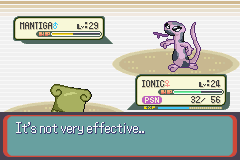
On Reflection: Regarding 10,000 hours, It's Not Very Effective

When evaluating educational gaming software, we need to avoid falling for the millions-of-hours hype that implies all games are created equal. One way to do this is to think about what our goals are for the classroom and how the experience of a game (or a lesson or a unit) will help us achieve those goals.

Many gamify--the-classroom fans like to quote Gladwell's idea from Outliers: The Story of Success about 10,000 hours. His claim is that if one practices a particular skill for 10,000 hours, one can become proficient. But for every World of Warcraft, there is a Tiny Castle. For every Carmen Sandiego there is a Temple Run. While many kids (and adults) have spent a good percentage of their 10,000 requisite hours becoming proficient at the game...at the end of the day they have mastered finger-swiping.

And that isn't even on the test.


Up Next:
Player demographics vs. Game genre; hidden agendas; creative vs. linear

References:
Most popular games of all time
Wikiepedia - Game Genres
Nielson 2009 Report on Casual Gaming

Tuesday, April 9, 2013

Shall we play a game? (part I) -- A Gamer's Initial Thoughts on #edtech Gamification


Ready Player One: Preparing for a Buzzword
A must read for Gamers
I can still recall sitting in my bedroom with the glow of a screen from the second level of Zelda. It was late, but I had pizza and Tab and a whole night ahead of me. I decided right then: Straight Through. No Break. No Dying. -- Time to save the princess.

So when I hear about the Gamification of learning, particularly from those who are passionate about the ability that it could have to transform the educational landscape, I become excited. If the same drive and will and energy that led me through those agonizing levels to defeat Gannon could be harnessed for the power of educational good -- EPIC WIN.

But as I begin to see "Gamification" making the same transition from innovative classroom technique to Edu.Vendor buzzword -- the same transition that "personalized" and "flipped classroom" made -- my excitement begins to slowly drain. My hyperkinetic eye movements (Pacman) and giddy shout of triumph (the first time I got Mario to bounce the turtles for 100 extra lives) are replaced by a sick feeling in the pit of my stomach: The sound of approaching doom ("I am SINISTAR")

It is thus with a nostalgic and hopeful mindset that I cautiously offer this multi-part prelection before I throw myself into Gaming as a tool to teach digital citizenship*:

*Note: Gamification encompasses a lot more than educational software and really a lot more than education in general. I am consciously limiting my focus for the purpose of this post.

Rescuing the Princess: Thinking about Goals
Gamers will go a long way for a goal
At the heart of gaming is a goal. It is this goal, and its similarity to a student's learning objective, that makes gamification appealing in the first place. After all, if a student will work voluntarily for hours to accomplish a virtual princess rescue, just imagine what we could pull off if we redirected it?

But goals are tricky things. First, they are only one part of a larger gaming landscape (we will cover other parts in the next post). A game can be burdened with a terrible ending, but can be overcome by excellent game mechanics (classroom activities) or even social features and scoreboards (group work, classroom leader boards).

Good game designers consider intermediate and long range goals carefully as they construct the overall product. The Gamification movement is about using built in structures such as rules and feedback loops to generate continued interest in the face of difficulty and challenge.

Simply saying "win the race by solving these math problems quickly" is not enough to qualify as an educational panacea, no matter how much you advertise the educational value of this particular prize. No virtual smiley faced "Badge" is particularly transformative in the long run. We have always known that kids love stickers and show them off with glee and pride.

Simply, there has to be a careful consideration about the GOAL OF THE GAME beyond THE GOAL AT THE END OF THE GAME. 


WOULD YOU HELP ME PLANT A PUMPKIN?:
The Other Goals of Gaming

There are also a number of "goals" at play in the big-picture of game-design that have little to do with saving the princess, but a lot to do with how the game is designed, marketed, played and replayed.

Interlude: Building a Tiny Castle
A casual game that leverages impatience to encourage spending
A new breed of game came along with social media websites that took "casual" to a whole new level. The goal of these environmental games might be to plant an attractive garden or build a farm. The ultimate goal though, is to get you to spend money.

In one version of this game-type, Tiny Castle, players are given extremely linear "quests". These quests might be to clear a forest, plant a specific type of tree, create a new species, or upgrade the castle. Each quest takes one or more of the essential game elements: food (to feed creatures), magic (to get rid of fog...just go with it), wishes (to become more powerful) and TIME. Lots and lots of real, one-second-at-a-time, TIME.

As we perform an analysis on the game mechanics, it would be easy to argue that the game could be an excellent way to develop time management skills and patience (i.e., if I set half of my denizens to work on a 3 hour goal and the other half to work on another 3 hour goal, I can finish two goals at the same time that will both be ready the next time I "check-in"). However, a careful look reveals a darker unstated goal. The most efficient way to grow fruit, gather dust, etc. is to be constantly plugged in, refreshing the mechanical action - strategy is replaced by repetitive clicking. Delayed gratification (setting things up and walking away) is discouraged by the game mechanic.

Know what constant clicking is? BORING!

So at any point a player can choose to supplement any of the slowly accumulating supplies by making an "in-game" purchase with real money. A player can even speed up an hours long building of a renovated castle with a wish/hour (and there are even "special sales" on wishes). To make matters worse, some of the QUESTS are completed by "making a purchase of new wishes" (but you know, the first taste is free).

Far from developing any sort of real-life transferable skill, the game discourages serious players from thinking of the game in that fashion. Even the in-game objectives lay the real objective bare: spend more real-life money on make-believe stuff.
End Interlude

While there are a number of people working on gamification (computer based and otherwise) who are passionate about learning and transformative classrooms, this prelection is a cautionary about what happens when the learning technique becomes "buzzworthy". I remember when I hit the vendor floor at ISTE last year and saw Interactive Whiteboard and Furniture vendors explaining how their equipment would help you "flip" the classroom.

The vendors are attacking "gamification" with a vengeance. We as educators need to be familiar with the strengths of Gaming before we are sold another in a long list of goods that have as much educational value as Treasure Chest of Apples or a new horse for a make-believe farm.

Up Next: 
Feel free to add, critique, comment, revise. This is relatively uncharted territory for this old school gamer and my thoughts are in flux.

Special thx to @40ishoracle (her latest post on collaboration rocks). She is the one who turned me onto Jane McGonigal, who is advocating games to save the world

Wednesday, March 27, 2013

When it is OK to say "NO" - An Twitter-based #edtech Reflection about IWBs

Today's post comes out of a conversation that happened out of a twitter chat that caused me to do a lot of reflection on whether or not my responses were a) appropriate or b) contradictory to many of the "Rules" that I laid out in my post from a few weeks ago (note: "10 Rules for a Successful #Edtech Department that have Little to do with Technology" is now the 3rd most popular post on this blog all-time -- thx)

Context: How Twitter Got me to this Topic
The premise put forth by @edtechempowers (Educational Researcher in Canada and great conversationalist), originally posted this comment:
Through the course of our conversation, it became apparent, that while he and I agreed about a number of things in the use of technology and the running of an IT department, he had little context for a technology department that is build around student learning, school mission, and teacher support.
This discussion continued the next day, as we outlined the difference between a collaborative tech department vs. one which is adversarial:

Again, the conversation was more about a frame of reference for a different kind of technology program than a fundamental disagreement about technology or programs. Where the discussion got interesting was when we talked about specific tools and the role of IT in determining use.

Then we started talking about SMARTBoards...

END CONTEXT

A Topic for Discussion -- The Interactive White Board (IWB)
Many of you know that I am not a huge fan of Interactive White Boards

Background
I was given a whiteboard in my second year of teaching and had a blast discovering interesting ways to use it (my favorite was using the interactive pens to show specific cinematography choices while deconstructing Shakespeare movies).

When I became the Head Geek of Brebeuf Jesuit, I was in favor of installing IWBs as part of our build-out. We hedged our bets a little by only putting the boards in 1/3 of the classrooms -- technology moves so fast that we didn't want all our technological eggs in one basket.

We put forth a lot of training efforts -- more traditional than our flexible model now -- but with a lot of teaming opportunities, modeling of creative ways to implement, and idea sharing.

One year later, while generally disappointed in implementation  we approved a SMARTBoard-in-every-math-room proposal to respond to competition and because of the use-case presented by the teachers. After two years of training, implementation, and reflection we found that:
  • The most common use for a SMARTBOARD was as a screen.
  • The most common "interactive" use for a SMARTBOARD was as a mouse.
  • The most common response after "do not use" regarding the digital "markers" was "I occasionally circle or underline something" (A common reason written in for why it was not used more was "I just forget")
  • There was little use of screen-shading, use of SMARTNotebook or other templates, or any features that would make it a more student-centered activity.
We finally determined that there were two teachers effectively using the SMARTBoard: one teacher had converted most lectures to a SMART format that would allow the teacher (and in some cases, students) to fill in sample problems using the inking feature and another teacher had a variety of student-based activities including puzzles, word searches, "races" etc.

After another attempt to "spread the word" on these techniques and offer more individualized PD, we as an IT department made the preliminary decision to quit buying Interactive Whiteboards. This was discussed with Academic Department chairs and we closed the book.
  • Follow-up 1: Teachers still wanted to be able to provide classroom interactive notes electronically.
    The most common use of our IWB - with Donuts
    and BatMonkey via @40ishoracle
    We found using a pen-based tablet PC, classroom computer, and UltraVNC (free software) adequately did the job -- for less money than a SMARTBoard.
  • Follow-up 2: 2 years later, a teacher commented on a constituent survey regarding the IT department -- "When am I getting MY SMARTBoard?" -- it was anonymous. Communication Fail.
  • Follow-up 3: 4 years later, we purchased an ENO board for our Teacher Resource Room. It is an excellent magnetic whiteboard. Each time we think "ooh. we could use the pen!", the computer has been re-imaged and does not have the software. Now we just take pictures of the board -- like the students.

The Challenge: Is It Ever OK for a Tech Department to Just Say "NO"?
Ouch. Talk about hitting me where it hurts. We are a 1:1 BYOT school. To argue that denying access to an IWB is a violation of our general premise of Access, Evaluate, and Use really caused me to pause. As we begin to gear up for the next capital project, a major renovation of classrooms, were we turning a blind-eye toward technology that could be used because of our bias?

JD's 3 Rules for When It is OK to Say "No"
(with an Two Important Corollaries): 


1. The primary method of evaluating classroom technology should be impact on Student Learning (Secondary, impact on teacher productivity).

When we developed our informal walk-through evaluation system for teachers, we placed a strong focus on "what are the students doing?". The activity of the students: collaborating, note-taking, reflecting, board races, presentations, etc. are one major focus of our environment. We should encourage techniques, tools, and behaviors that enhance student learning and discourage the same when it takes away from learning.


2. The metric for student learning should be informed by the teaching methods, student context, and objectives of the school's mission
School's have personalities that are based in part on the mission and culture of the institution. In a Jesuit school, there is a heavy focus on student-teacher relationship (an understanding of student context, a trusting and caring atmosphere) and the time and space to reflect on new experiences. If a tool or technique does not provide substantive new experiences or new ways for each individual student to reflect, then the tool runs counter to the mission and should not be adopted (it is for this reason that many of our school consultations begin, not with a "state of technology" report but with an analysis of a school's context and mission).

One of our Biology teacher's put it succinctly, "Even if you have a great interactive student-centered lesson for the SMARTBoard, it's still only one student at a time. I need more efficiency in class."


3. Because there are limited resources to buy technology, time to spend with students, and opportunities for learning experiences and reflection, some technology should be discouraged or avoided - even if it "could be good".

Ultimately, decisions have to be made on a global level. Will every classroom have a projector? a document camera? an IWB? a textbook? a computer along the back wall? a tablet in each student's hand?

Once decisions are made about the impact of a particular technology on student-learning within the context of the school's pedagogy and mission, then choices must be made about universal classroom technology. These choices can be upsetting to some teachers, but if the decisions are made out of student-impact and mission, the conversation, while painful can be authentic and even a good thing.


Corollary 1: The Admin Variation -- It is important to understand that the determinations described above are seldom in the realm-of-care of most tech.staff in an IT department. This is the realm of the Principal, the Academic/Curriculum leaders, and the Educational Technology integrators -- that includes teachers! A decision to eliminate a technology tool or to stop pursuing a path should be one of academics in all but the rarest of occasions (I am picturing a bizarre conversation regarding "we need to stop filtering for viruses because of the following academic benefits...")


Corollary 2: The Open-to-Growth Exception -- Decisions made across the board should be open to variations based on effective teaching and student impact. Just as the initial evaluation of a tool is based on the use-case and real data, the unique implementation in a classroom may be an exception to the rule. I have told the two teacher's described above that they will have the last two functional SMARTBoard in the building. They have found an effective use-case that goes beyond the typical implementation of IWB-as-oversized-mouse-for-the-teacher. Their unique use-case justifies technology that may not be used anywhere else in the building.

In the same way that pilot programs can be used to build a case for new technology in a school, an effective IT/Administrative Team will be open to finding the exceptions in policy that allow for an individual teacher to leverage technology effectively in a way that other educators were unable to do.

So there you have it. Even the most open-to-ideas, student/teacher centered program can still reject an idea or tool or technology.

Sometimes.


Friday, March 22, 2013

Answering "What's Next?" - Classroom Technology Beyond BYOT (with pictures and bullet-points)

One of the problems with pulling off an important (if small) Educational Technology revolution is the inevitable questions from excited faculty, students, and trustees: "What's Next?" While the temptation is strong to answer, "reading some comic books and 3-starring every level of Angry Birds", that is not acceptable and probably not good for student learning.

Thus, we began to embark on our next level of technology integration: What should a classroom look like in a BYOT environment.

We began in similar fashion to what eventually became our 1:1 BYOT solution -- we asked the teachers and students:

1. What is the most frustrating thing about teaching and learning in your classroom right now?
2. What would make you a more effective educator if we gave it to you next year?
3. What would the ideal learning environment look like?

And boy did we get answers!

Flexibility:
Whether it was from teacher-teacher or from activity-to-activity, teachers wanted the ability to change the layout of a classroom quickly, without a lot of effort. This came from Social Studies (Harkness table configuration with Primary Source discussion), World Language (quick changes from pairing to small groups to teacher-centered instruction and back again within the same period), to Math (we like our rows, but it would be nice if we could get in between them faster without tripping over bags -- you have to stay mobile when ever kid has a device).

Collaboration:
While the standardized testing advocates get a giddy little thrill every time they release a document that pretends learning is an isolated experience between the student and the electronic equivalent of a bubble sheet, learning is about engagement -- engagement with material, engagement with the teacher, engagement with each other. Teachers and students alike wanted a classroom where collaboration did not feel like a tacked-on after thought.

Space to Write, Tools to Share
Who needs an Interactive Whiteboard? Just give us colors!
After flexibility, the number one request was MORE WHITEBOARD SPACE. Three walls, paint the walls with whiteboard paint, get individual boards around the room. -- It was really a dream come true for a whiteboard aficionado like myself (totally had to look up that spelling).

As teachers begin to move from experience to reflection, sometimes the process of sharing that reflection is best written down where others can see (Think-Pair-Share and Gallery Walks are good examples of this). As the front of the classroom diminishes and students take more ownership in the classroom, a natural outgrowth of this is the need for more surface area capable of capturing ideas.

...and then there is technology
Ever try to have a beyond 1:1 discussion about technology with the interwebs? It is NOT pretty. It quickly degenerates into camps based on Android or iOS, or it becomes "Walls? Where we're going, we don't need walls!" from the blended-distance learning camps.

So here is our context:
  • We already start with learning objectives and student engagement in mind. Technology is a tool that gets us to stronger relationships, better (read more authentic) experiences, and opportunities to engage in personal and collaborative reflection (what Jesuits call LEARNING).
  • We already have a device in each student's hands and the device is one that they chose based on personal experience, reflection, and context.
  • We are working to create a learning environment that is flexible and student centered, focusing on the learning activities that maximize our mission and pedagogy.
Our thoughts so far:

  • Maximize flexibility and sharing with Multiple Displays and Student Device Connections
  • Create simple control systems that allow teachers and student to quickly do what they want
  • When possible, hide wires and connections and make the systems tamper-proof
  • Use Document Cameras and Classroom Recording technology to make access to notes and activities flexible in time and space.
  • Even when items must be fixed for electricity or network, give a teacher the option to clear the space for other activities

Our Teacher Resrouce Room -
Brainstorming Central
Over the next few weeks, teachers will begin to give feedback on the tools that they would like to see in their classroom and we will begin the process of designing our next generation BYOT classrooms. Feel free to peruse the document below. We will be hanging it in our Teacher Resource Center for discussion and feedback and finalizing the look and feel of our next iteration of the classroom.


  • What did we miss?
  • What do you like?
  • What will transform teaching and learning in your classroom AFTER you are 1:1?
  • What are the goals that you have in mind when considering classroom technology?

Feel free to leave comments down below or on social media. We appreciate the feedback and will use it in our decision making process (which the Jesuits call Discernment - they have a word for EVERYTHING)


Tuesday, March 19, 2013

Gadget talk: A Windows 8 Tablet Review - an #edtech perspective

One of the basic things that the IT department has to do at our school is play with toys (yay!). Since we are a 1:1 BYOT school, we are often testing devices to see a) how well they work in our environment (the network, the classrooms, etc.), b) whether they are worth recommending to partents, and c) what we need to know when there are problems.

My latest test was the ASUS VivoTab SMART. I first saw this tablet at #FETC13 and was very intrigued with it for a number of reasons:

VivoTab SMART w/ Transleeve Keyboard

  1. Full Windows 8 - none of the RT Only stuff*
  2. Really thin and light - made my ASUS Transformer Prime seem a bit heavy
  3. I'm a fan of the ASUS Brand - My favorite miniTab is my nexus 7 (which i carry around regularly despite having a Galaxy Note "phablet") and the aforementioned Transformer Prime (which i dutifully carried around before realizing that I only used it to read comic books).
  4. The 64gb version of the tablet comes in under 500 dollars. the Transleeve keyboard and cover add an additional $125. So for a little more than an iPad you get a full windows computer, in a tablet, with a keyboard -- color me intrigued (it's kind of a dusty purple color).
* Ok, for the non-geeks out there. Windows 8 comes in two (ok, three) flavors. The full version of Windows 8 has the familiar desktop and apps but ALSO has a tablet-style interface which is called RT. There are also tablets that strip out the Windows Desktop portion and only have the tablet stylings and tablet-specific Apps. These are RT tablets. -- To be continued

Origami folding cover w/ incredibly thin bluetooth keybaord
Since I am not yet famous enough to have companies throwing their wares at me for review (what is UP with that?), I had to find one on my own. As is the case with most ASUS products, finding the device proved simpler than finding the Keyboard/Cover combination that makes this unit really appealing. Once I had the product in hand, I put away my beloved Samsung Chromebook and dedicated myself to using the VivoTab as my primary device for four weeks. I made it about 3.

Rather than give a lengthy play-by-play review of Window 8, the interface, the hardware, etc., I am going to try to keep this focused on a few basic themes that I think will be relevant to educators and other users curious about the Windows 8 tablet environment. 

Windows 8, the RT Interface, Oh My
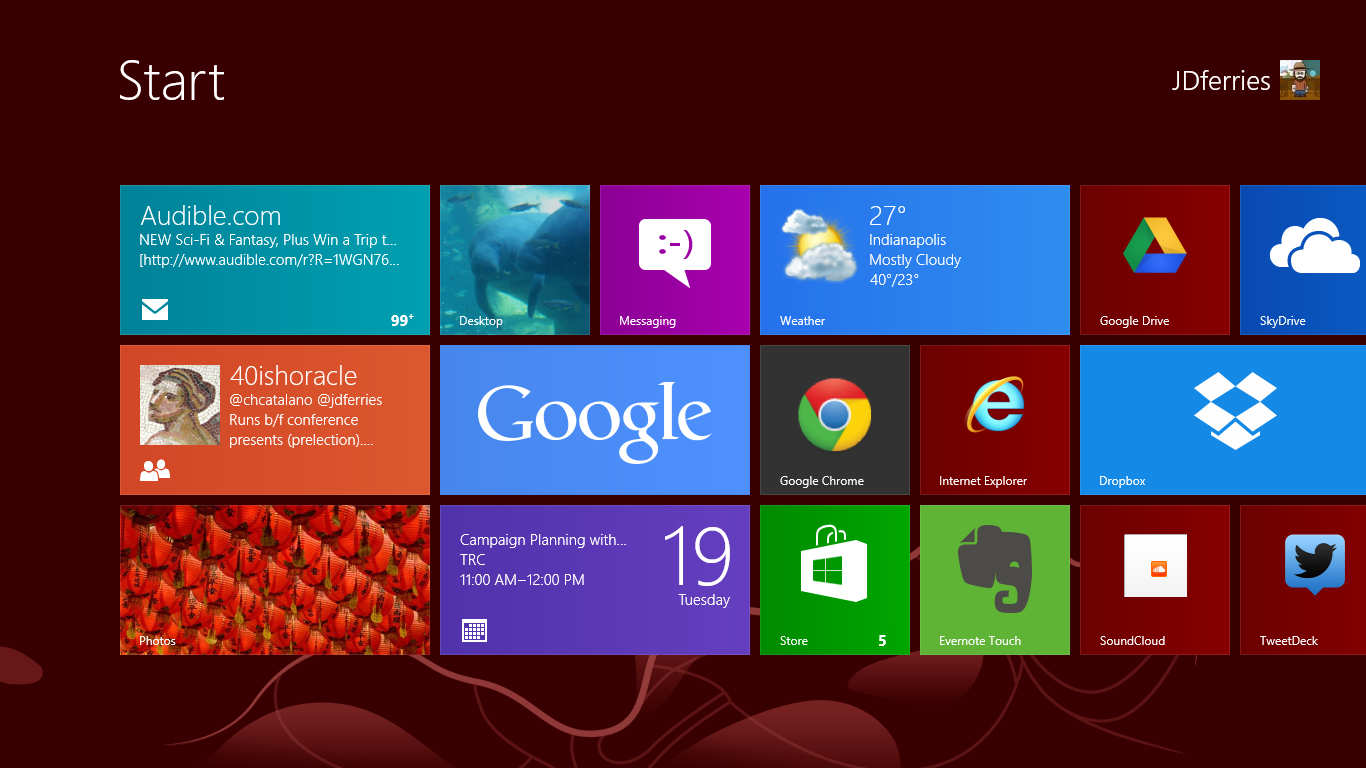
A new "Start"  interface for selecting programs
There has been a lot written about the confusion that is inevitable with the Windows Desktop vs. the Windows RT environment. How will normal human beings every be able to cope? We have a number of our teachers who have requested the Windows 8 upgrade and, I am pleased to report, learning is still taking place.

PD Tip: think of the RT interface as a very fancy START button (this is easy, since one of the ways to access the RT screen is to hold your mouse in the bottom left corner).

From this screen, you can access a variety of Apps and a market place to add more. Some of them, such as the People App, Photo App, and the Mail App are live tiles that rotate with updates of recent posts, pictures, subjects. All of these apps tie-in with major email programs and social networks. In addition to the apps on the RT side, you can create shortcuts for frequent websites and buttons for frequently used programs (I made a group of tiles for the full MS Office, a tile for tweetdeck, etc.)

A press of the desktop app and you are at a classic windows screen complete with file folders, "my documents", all the classic programs, etc. 

The "Killer" Feature: It's Windows - Full Windows - On a Tablet
I cannot stress this enough. You have a full version of Windows. In a package that is as light and portable as a tablet. Need to screencast using camtasia? - you can. Need a heavy duty word processor? - it can be installed. The first night I was using the computer I was getting ready for a hashtag chat and realized that I hadn't looked for a decent twitter app yet. "Oh. Wait. I can just install Tweetdeck!" 

Having worked with students in our 1:1 BYOT environment for almost a year now, the strongest cases of buyer's remorse come from tablet users who love the design but want more power, fuller programs, etc. As I look to the future, I am somewhat reminded of the early days of netbooks. While netbooks started with Linux and Android, and custom software, eventually, Windows became the dominant operating system. There is just something about a full-feature OS that is part of a regular workflow, be it for a student or teacher. Add to this the ability to break out of an app walled-garden and install full versions of software and you have a lot of potential. I saw jaws drop when teachers noticed that i was taking attendance on our windows-only web-based gradebook from a tablet.

...But it's a Tablet - A very early Tablet
There is an incubation period with all tablets. When the iPad debuted, it was months before people really started to figure out what to do with the real-estate. When I bought my first Android phone (a Nextel phone that was still using Cupcake while all of my friends were eating Froyo). I remember thinking that it had 80% of what I was looking for on a phone but was nowhere near the maturity that I had imagined.

A big finger must for non-touch apps
Switching from a Nexus 7 (running Jellybean) to the Windows RT side, I am forced back into the nascent incubation stage where developers and manufacturer are waiting to see if the product is worth the investment.

Up until last week, there was no Twitter app for the Windows RT side of the tablet. While it was wonderful being able to install tweetdeck, the interface is not optimized for touch. This meant either using the keyboard (not bad for chats, but annoying for quick tweets) or constantly trying to use my finger to scroll up by aiming for that way-too-thin scroll bar (it was frustrating enough that I bought a Wacom Bamboo pen - that is a handy little device).

I was constantly running into things that were either not-ready-for-primetime (the evernote app, while present has a very constrained feel compared to the more mature apps on the other mobile platforms) or non-existent (a quick photo editor, messenger app such as gtalk or Kik, Instagram, Pinterest, good RSS reader, etc.). Some of this is a result of market issues - Google is playing coy with the interface, creating a search app and a chrome browser, but not RT versions of other major products. Part of this is the wait-and-see. Regardless, for those used to full feature tablets on either side of the ShinyFruit-CuteRobot divide, they will have some frustration.

Design - It's All about the Use Case
In some ways, everything about the VivoTab that I liked in Florida is absolutely dead-on. It is light and thin and easy to hold and feels very natural in my hand. It is as comfortable as any 10" tablet when I fire up the Comixology App and settle in to see how Batman reacts to the death of Robin (spoiler alert: not well).

There is not comfortable way to do this
But the devil, particularly in design, is in the details. A primary use case for me is to take notes and live-tweet during presentations, keynotes, meetings, etc. I can comfortably do this on my chromebook and on my transformer prime. It is nearly impossible for me to do this comfortably on the VivoTab. There is a minimum amount of surface area required for a device to rest comfortably on a lap. The Microsoft Surface pulls this off by using a kickstand and a magnetic attachment to the keyboard (we tried it, MS naysayers). Because the VivoTab keyboard does not attach to the device, you have very little surface area with which to work. So you end up using the onscreen keyboard (which is not bad, but its no SwiftKey) or you end up with some awkward positioning (see photo).

My best #FETC Swag - Avid AE-36
One presumed must-have in a Windows computer is a USB port. I was surprised when I went to start a Google+ Hangout that there is no full USB port, thus no USB headphones and no wireless mouse with micro-USB dongle -- both things that I would have made part of my regular use case. Luckily, my Avid headphones (another #FETC find) worked great by maximizing the Input/Output Combo port work like a charm.

Final Thoughts -- The Race is On
oh so portable. Keyboard
magnetically stored inside cover
I think that many parents and students, given the choice between a mobile tablet OS and the potential of a full-function machine will find full-Windows 8 tablets very appealing. While they will have to be careful to think through design and power choices (for example, ASUS is about to release a larger VivoTab that will have a high-res screen, a keyboard identical to the Transformer (with spare battery and full attachment), and a digitzing stylus to boot, there is something very appealing about having one device that does it all.

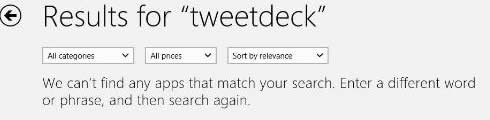
But essential to the tablet experience will be the tablet-side of the OS, namely RT. While it is wonderful to be able to open a full OS and have programs on there that I cannot access in iOS or Android, sometimes a user just wants a tablet...and a tablet is only as good as its apps. All too often, there are no results or, even worse, 3rd party crap-ware that claims to do that which it does not do (there are SO many "instragram viewers" that just link to the website). Without a satisfying tablet experience (particularly as so many people have not had a good app experience from Google&Co. or Apple), the Windows 8 advantage will be overshadowed by dissatisfaction.
I started to dread the "no apps" screen

So I see this as a race. Can Microsoft entice developers and upgrade the RT experience fast enough to be comparable with its competitors? If it can, the current "full OS experience" advantage is a huge boost, particularly if the prices stay competitive. But the pressure is on.
  • Because each day, more and more people are realizing that a "tablet" experience, while limited, can fulfill most of their day-to-day needs.
  • Because the ChromeOS experiment is bearing fruit and the winds of change are forecast the merging of ChromeOS with Android (oooh a chromeOS tablet).
  • Because the not-so-hidden cost of a full OS is the price of programs (Office and Camtasia are wonderful, but they are not a $1.99 in the App Store). Consumer realize this.
For schools and educators and students, these products have the potential to be very appealing. But I believe that the current RT/App experience is enough of a drawback that it does not make up for the ultraportability of the form factor.

And if you are curious, I am glad to be back on my Chromebook
(and carrying my nexus 7 for tablet needs).

Have other questions? Different experiences or thoughts? Share them down below or hit me up on social media -- I'm around :)


Tuesday, March 5, 2013

Ten Rules for a Successful #edtech program that have little to do with technology

Zooming out to see the big picture:
The @40ishoracle and I have spent a lot of time travelling and talking about BYOT and Digital Citizenship, and professional development techniques (including free coffee, comfy chairs and Twitter chats). In the last few trips, we have been asked to modify some of our presentations to focus on something that we constantly touch, but very seldom present on specifically: How did we get ourselves into the position as a school to be able to do some of the cool things that we have done?

It's an intriguing question, particularly as a school that went 1:1 BYOT but often recommends other solutions for schools based on their mission, school population, infrastructure and student needs. The more I thought about it from the head-geek standpoint, the more I realized that, while there is not one-size-fits all magic device or magic LMS...That doesn't mean that there aren't some nearly universal mindsets that will help a Information Technology department work effectively within a school and in partnership with teachers and students to make learning awesome. Thus, I humbly submit:

JD's Ten (or so) Rules of a Technology Department that have Very Little to DO with Technology!
(Ta-da!)


1. Form Relationships

The six months that I spent at Brebeuf Jesuit was an interesting time for me. I was hired to make significant changes in the way that educational technology was used in the classroom and the school and some administrators were waiting for me to wave the magic wand.

The Teacher Resource Room is one key to keeping the
conversation going about tech and education
They became frustrated because I spent most of my days walking around the school, watching classes, having conversations with teachers. I was learning about the school, its mission, and its people. While this is difficult and draining for severe introvert, it was the key to identifying problems (with the computer networks and the human-communication ones), beginning to plan, and getting people to see what was possible. Ten years later, this basic maxim is still true. The most important network the technology department can have are the teachers who leverage the technology and the students who use it as an extension of their being.

Practically applied: We created a space for teachers to meet, gather and plan called the Teacher Resource Room. We stock it with free coffee, bring in donuts on Thursday, and use it for informal gatherings, idea sharing (the brown-bag lunch), and brainstorming (whiteboards!).

2. Find People and Processes to Bridge the Gaps

This nameplate sits on @40ishoracle's Desk
The most important role in a school that wants to expand its educational technology program is the #edtech coordinator. This role became so vital in our school that when it became time to reorganize the Principal's office the natural person to help with faculty development, evaluation, and curriculum was the #edtech who had been informally doing that job for five years.

The key to the #edtech role is not based on an expansive knowledge of educational gadgetry or lists of links to include on the ubiquitous "Website Wednesday" Newsletter. The best #edtech is an educator who is capable of discussing learning objectives with teachers and then translating those objectives and dreams into concrete work orders that can be understood by techs. They serve as the bridge between two very different types of personalities (for a tongue-in-cheek look at Tech-Geek and Teach-Geek personalities, check out this post).

Practically Applied: Processes can also help to alleviate tensions between the classroom and the technology-cave. One simple method that has immediate impact is a triage system of tech issues that prioritizes classroom issues. If teachers have confidence that issues in the classroom are going to be solved quickly, they are more likely to devote class time to integrate technology.


3. Start with Learning Objectives 
Our BYOT reflections during "Boot Camps" began
with learning objectives, not tools
Want a quick test to see if a the latest cool new thing was designed by teachers or test-them-all advocates? Count the number of minutes before the sales person refers to a practical and specific student-base learning objective. If they generically refer to "personalizing education", "appealing to learning styles", or "providing data driven solutions" then it is likely that this device has never been seen in a regular classroom.

At the #edtech and brainstorming level (note: this means in the TRC, not the tech room :) ), we start almost every conversation with a teacher, "what are you hoping to have your students learn?" -- When the initial focus is on the content or the skills of the students, then it becomes difficult to derail the activity with shiny-pretty smokescreens.

Practically Applied: The grand design for our BYOT initiative started with focus groups of teachers and students: "What would you like to see in your classroom in the next 3-5 years that would transformational to the way students learn and the way you teach?" Questions like these began students and teachers thinking about how the most basic things they do in order to learn.

4. Think of the Use Case
ASUS VivoTab: Full Win 8  w/
SmartSleeve Keyboard, great on table
Similar to starting with learning objectives, we often evaluate new tools or initiatives at the most basic level of Use Case, namely, "how will this be used day-to-day." This seems to particularly apply to large implementations. Rather than being dazzled (or from the teacher point-of-view, overwhelmed) by a piece of technology, run it through paces. This can be done as a mental exercise or ideally as a pilot.

When the test of technology is use-case and not the spec sheet that is provided by vendors, the way the data is interpreted becomes different. The Learning and other
...but a laptop fail

Practically Applied: I spent two weeks playing around with an ASUS VivoTab. It was one of the best Windows 8 (not RT) tablet experiences that I have had (yes, I am working on a review). BUT, on the most practical level, it was nearly impossible to use the tablet/keyboard combination comfortably in my lap -- a requirement when trying to send out snarky tweets about a keynote speaker.

5. Build it Before They Come
Most teachers can describe a training initiative in technology that failed miserably. Often, if you listen closely, there are certain similarities to the tales. One of the most common occurrences is a promise of a technology, or tool, or method that either a) never materializes or b) shows up so far past the training, that teachers have moved on in both practicality and enthusiasm before ever integrating the tech.

Practically Applied: Tech departments should begin to speak of initiatives in very consistent and easy-to-understand terminology outside of the technology room. In our school we talk about "Investigations" (surveying technology, gathering ideas, tweeting), "Pilots" (limited tests by people who are giving feedback about classroom impact, stability, etc.), "Burn-in" (Technology is available but glitches are still being worked out) and  "Rollouts" (technology is available and ready to use).


6. Avoid Myths and Hype
Giving up on the One LMS Myth
There is no one gadget that will fulfill the needs of every student and every teachers
There is no one technology that transforms every lesson to a multi-variate experience that meets all students learning preferences
There is no Learning Management System that makes every teacher a data-driven-decision-making automaton capable of raising test-scores with the blink of a mentor-camera's electronic eye

Technology tools are designed to accomplish specific tasks in specific ways. Leveraging those tasks and methods into a learning experience takes experimentation by teachers and students. The more experienced the teacher, the more willing the students, the more focused on the learning objective, the easier it becomes to evaluate specific technologies for their educational impact.

but there is no magic wand. Period.

7. Deal with Conflict Openly and Honestly
The best of technology departments are servants to a variety of people, including students, teachers, administrators, parents, and Departments of Education. Any one of these constituents may be able to play a trump card that can frustrate another group. This can happen when the Testing Overlords declare that no device that cannot be managed can be used for high stakes testing. This can happen when parents demand online grade-updates as a matter of competition within the schools. This can happen when teachers insist on a specific program regardless of compatibility with student devices.

In these cases, it is best to let those who disagree have the conversation. Parents and Administrators, Teachers and Students, etc. can have productive, student/learning centered conversations about what system will ultimately meet the mission and student objectives of the school. Note: Technology has almost no dog in these races. Outside of network integrity, data security, and a few other practical matters, technology (see #2, Relationship Manager) serves as an implementer, not a decision maker.

Practically Applied: During our BYOT implementation discussions, the math department, a high-functioning technology department, had an extended discussion about requiring all devices to be pen-based, preferably digitizers and even more preferably windows-based tablet PCs (the device of use for all math teachers). This conflict had the potential to sidetrack the entire initiative. As the discussion progressed, math teachers and techs began to isolate the underlying student-based needs of the class apart from the technology:

  • the need to take notes that included drawings. 
  • the need to have access to digital notes. 
  • the need to turn in assignments for homework. 
Experimentation and conversation about learning objectives showed that while some technology may better enable student learning, no specific device or technique hindered the learning irreparably.


8. Acknowledge Non-negotiables, Plan Accordingly
Occasionally, there will be non-negotiables. They are becoming increasingly rare in a world where BYOT and consumerization are impacting the classroom so strongly, but they do exist. Again, the best approach to a non-negotiable (examples include caps on bandwidth, requirements to post grades, forced authentication to wireless networks, etc.) is to be honest about it and let it frame the discussion.

A non-negotiable should be:

  • explainable in terms of student learning or some other mission-based part of the school (we have to cap individual student bandwidth to ensure that classrooms have access to enough of the data stream).
  • agreed upon by a variety of constituents (we usually use tech, teachers, admin, students or some combination) as a necessary if not preferred course of action
  • able to be reviewed as technology, classroom methods, demographics, etc. changes.
Practically Applied: The transition from a command-level wireless network to an open wireless that allowed student devices was a study in "what are the non-negotiables". This included discussions of mandating virus protection (ultimately we decided to not to require) and authentication (we require students to use a name and password so that if they engage in inappropriate activity we can have that discussion with the student as a learning opportunity).


9. Lead as Required
Excellent leadership position: sitting at the table
Rule number nine has gone through a number of drafts. It included "don't lead from the top-down" and "don't lead at all". Ultimately, the technology department operates best when its primary goal is to facilitate learning and teaching to the best of its ability. Because a well-run technology department has time to explore new ideas and new techniques, it is often in the position of recommending methods that some teachers may not have seen.

Leadership then becomes a hybrid of many of the rules discussed. It is a system of using personal relationships to identify needs and desires and frustrations. It is putting in systems that address student needs quickly and thoroughly. It is running a technology plan that is driven by learning objectives, clear in its goals, effective in its implementation, and open for review as times change.

It requires openness and flexibility and patience and a lot of caffeine.

10. Respect the Classroom as Sacred Space
Its not about the robot
When we put away silly debates over test scores and manufactured crises in order to increase sales of testing materials and test-prep textbooks, we remember something important: Classrooms are sacred. More specifically the learning that happens when a student and a teacher are engaged in a give-and-take that opens the mind to new experiences and lets a student authentically reflect on that experience -- that is a magic that I would put above any unibody construction with a glowing piece of fruit (heck, I would even put it above a lime green robot).

Any technology department in any school should begin and end with an understanding of how learning works. Without this foundation, programs will miss the mark and teachers will be frustrated because they do not understand how decisions are being made or what is truly important. Does this mean every tech has to be a former educator? That might not even be ideal. But the department as a whole should understand its position in the school is one of serving the greater mission of the school. It is less about authority than it is about facilitating. Less about command and more about service.

- - -
So there you have it. An attempt to distill our secret formula for running a technology department. Would love to hear your thoughts and ideas, additions, or changes to the departments that you run or have encountered. Drop a comment down below or reply to us on social media.