Tuesday, April 9, 2013

Shall we play a game? (part I) -- A Gamer's Initial Thoughts on #edtech Gamification


Ready Player One: Preparing for a Buzzword
A must read for Gamers
I can still recall sitting in my bedroom with the glow of a screen from the second level of Zelda. It was late, but I had pizza and Tab and a whole night ahead of me. I decided right then: Straight Through. No Break. No Dying. -- Time to save the princess.

So when I hear about the Gamification of learning, particularly from those who are passionate about the ability that it could have to transform the educational landscape, I become excited. If the same drive and will and energy that led me through those agonizing levels to defeat Gannon could be harnessed for the power of educational good -- EPIC WIN.

But as I begin to see "Gamification" making the same transition from innovative classroom technique to Edu.Vendor buzzword -- the same transition that "personalized" and "flipped classroom" made -- my excitement begins to slowly drain. My hyperkinetic eye movements (Pacman) and giddy shout of triumph (the first time I got Mario to bounce the turtles for 100 extra lives) are replaced by a sick feeling in the pit of my stomach: The sound of approaching doom ("I am SINISTAR")

It is thus with a nostalgic and hopeful mindset that I cautiously offer this multi-part prelection before I throw myself into Gaming as a tool to teach digital citizenship*:

*Note: Gamification encompasses a lot more than educational software and really a lot more than education in general. I am consciously limiting my focus for the purpose of this post.

Rescuing the Princess: Thinking about Goals
Gamers will go a long way for a goal
At the heart of gaming is a goal. It is this goal, and its similarity to a student's learning objective, that makes gamification appealing in the first place. After all, if a student will work voluntarily for hours to accomplish a virtual princess rescue, just imagine what we could pull off if we redirected it?

But goals are tricky things. First, they are only one part of a larger gaming landscape (we will cover other parts in the next post). A game can be burdened with a terrible ending, but can be overcome by excellent game mechanics (classroom activities) or even social features and scoreboards (group work, classroom leader boards).

Good game designers consider intermediate and long range goals carefully as they construct the overall product. The Gamification movement is about using built in structures such as rules and feedback loops to generate continued interest in the face of difficulty and challenge.

Simply saying "win the race by solving these math problems quickly" is not enough to qualify as an educational panacea, no matter how much you advertise the educational value of this particular prize. No virtual smiley faced "Badge" is particularly transformative in the long run. We have always known that kids love stickers and show them off with glee and pride.

Simply, there has to be a careful consideration about the GOAL OF THE GAME beyond THE GOAL AT THE END OF THE GAME. 


WOULD YOU HELP ME PLANT A PUMPKIN?:
The Other Goals of Gaming

There are also a number of "goals" at play in the big-picture of game-design that have little to do with saving the princess, but a lot to do with how the game is designed, marketed, played and replayed.

Interlude: Building a Tiny Castle
A casual game that leverages impatience to encourage spending
A new breed of game came along with social media websites that took "casual" to a whole new level. The goal of these environmental games might be to plant an attractive garden or build a farm. The ultimate goal though, is to get you to spend money.

In one version of this game-type, Tiny Castle, players are given extremely linear "quests". These quests might be to clear a forest, plant a specific type of tree, create a new species, or upgrade the castle. Each quest takes one or more of the essential game elements: food (to feed creatures), magic (to get rid of fog...just go with it), wishes (to become more powerful) and TIME. Lots and lots of real, one-second-at-a-time, TIME.

As we perform an analysis on the game mechanics, it would be easy to argue that the game could be an excellent way to develop time management skills and patience (i.e., if I set half of my denizens to work on a 3 hour goal and the other half to work on another 3 hour goal, I can finish two goals at the same time that will both be ready the next time I "check-in"). However, a careful look reveals a darker unstated goal. The most efficient way to grow fruit, gather dust, etc. is to be constantly plugged in, refreshing the mechanical action - strategy is replaced by repetitive clicking. Delayed gratification (setting things up and walking away) is discouraged by the game mechanic.

Know what constant clicking is? BORING!

So at any point a player can choose to supplement any of the slowly accumulating supplies by making an "in-game" purchase with real money. A player can even speed up an hours long building of a renovated castle with a wish/hour (and there are even "special sales" on wishes). To make matters worse, some of the QUESTS are completed by "making a purchase of new wishes" (but you know, the first taste is free).

Far from developing any sort of real-life transferable skill, the game discourages serious players from thinking of the game in that fashion. Even the in-game objectives lay the real objective bare: spend more real-life money on make-believe stuff.
End Interlude

While there are a number of people working on gamification (computer based and otherwise) who are passionate about learning and transformative classrooms, this prelection is a cautionary about what happens when the learning technique becomes "buzzworthy". I remember when I hit the vendor floor at ISTE last year and saw Interactive Whiteboard and Furniture vendors explaining how their equipment would help you "flip" the classroom.

The vendors are attacking "gamification" with a vengeance. We as educators need to be familiar with the strengths of Gaming before we are sold another in a long list of goods that have as much educational value as Treasure Chest of Apples or a new horse for a make-believe farm.

Up Next: 
Feel free to add, critique, comment, revise. This is relatively uncharted territory for this old school gamer and my thoughts are in flux.

Special thx to @40ishoracle (her latest post on collaboration rocks). She is the one who turned me onto Jane McGonigal, who is advocating games to save the world

Thursday, April 4, 2013

Competing for their Hearts and Minds -- #Digcit Thoughts from a RoadTrip Vacation

My wife and I are taking the family on one of those road trips that seem to be a necessary  rite of passage of raising-a-young-family that no one can explain. This post is a collection of reflections made on the journey -- Because you can take the #edtech geek out of the school, but you can't take the school out of the #edtech geek.

Different Tools, Different Data, Different Results
On day three of our journey, we are planning on driving from Atlanta, GA to Raleigh, NC. My wife has been referring to the 4.5 hr journey for a few days, but when talking to our relative in NC, she says it is closer to six hours. She says "But mapquest said it was 4 and a half."

I pull out my Nexus 7 and ask Google Now for a map to Raleigh: Six hours and 15 minutes.

My wife (annoyed): "But why would it change? I Googled it just a few days ago!"
Me (in interesting-conversation-about-tech-mode when I should have been in husband-consoling-wife-who-has-had-her-plans-derailed-mode): I thought you said you had used Mapquest?
Wife (now annoyed at me): I used something. Why would they be different?

...and while i could think of all sorts of reasons for differences including accuracy of routes, real-time information (those cool Google cars), differing calculation methods, real-time traffic or construction updates (not to mention any number of human error issues), I had picked up on the fact that this was NOT the conversation my vacation planner and mother of my children wanted to have...but it got me thinking.

The Information Conundrum
Waze Crowd-sourced mapping
What my wife experienced  is an increasingly common occurrence  People in stop-and-go traffic who pull up
a traditional GPS will often be frustrated by a red (slow) traffic line, but little information. But if that same person is using an app called WAZE, they can get minute-by-minute updates from real users, including the guy 2 miles ahead saying "they have the semi off the road now. traffic should start moving any minute." And while mapping and travel seem to be one of the easy highlights (Apple's early foray's into maps was well-documented as one of the companies few but often entertaining stumbles), there are a number of areas where we are beginning to see this issue arise for our students.

The internet houses websites and blogs galore which at first glance can appear to have valid information. However, as the ease of creating and distributing information has increased, we have not had a corresponding rise in our capacity as humans to filter through this information and distinguish bad information from good. And this is not just a situation created by the rise of the blogosphere.

Billboards and Displays of Competing World Views
As we are travelling down the highway on the way to Raleigh, I see a billboard that shows a caveman fighting/running from an old-style Tyrannosaurus Rex (you can tell older depictions from the positioning of the tail. If it drags on the ground Godzilla-style, its based on older anthropological models). It is an advertisement for a Creationist Museum - a concept I am familiar with due to our proximity to one in Kentucky -- I just didn't realize that they had franchised.

The newest creation museum advertising eliminates the "controversy"
in favor of the draw of Dinosaurs. Thunder lizards are cool.
There are currently 16 Creationist Museums. These museums are typically privately funded with a

combination of models, animatronic displays, professionally produced videos and interactive activities typical of the modern museum experience. In fact, the many of the museums get high reviews from visitors and have been featured as tourist destination highlights. What is noteworthy about these museums is that the exhibits are based on young-earth/creationism interpretations of the origin of life and the planet.
The "Come Meet Your Relatives" sign outside the
Mammal wing of the Museum of Natural History

Either the Earth is 4.54 Billion years old or it's 6,000 years old. Relativism, while popular as a moral stance (that will be a rant for another day), is not as easily applied to geology.

But thousands of people a year visit these museums that cost millions of dollars in order to learn from what National Center for Science Education director Eugene Scott called " the Creationist Disneyland". The discussion that ensued in the car-ride ranged from young-earth positions, to carbon dating, to evolution and catholic teaching. It led to one of our daughters pointing out the number of evolution references made at the Smithsonian Museum for Natural History (although the Gem displays were the biggest hit).

The point here is not good science vs. bad science. (see the original #savethedinosaurs post for some of that). There are two highly funded competing world views fueled by scientific method, research, religion, morality and money that are vying for the eyes, hearts, and minds of our students.

  • What are the specific skills that students need to develop in order to function in this world of competing information and data?
  • Regardless of the status of the Common Core and its corporate sponsored testing offspring, what should schools be doing to put in place the development of these skills and habits-of-mind? 
  • At what age do our students have to develop the capacity to use their skills and capacity for rational thought to determine which of these world views they will subscribe to and follow?

#Edtech, #Digcit, and #BYOT -- Identifying the Essential Skills
1. Claim and Analysis: Students must be able to find factual claims within a piece of writing, be it a tweet, Facebook vanity card, news article, or research paper. They should be able to identify and evaluate the supporting evidence (or in most cases lack thereof) which supports the claim.

Practically Applied: We use the student newspaper. Preliminary questions we ask are:

  • Do you trust this source? 
  • What reasons do you have in-source for this trust? 
  • What reasons do you have beyond the source for this trust?


2. Identifying Assumptions: World views are loaded with assumptions of truth. Identifying these assumptions and treating them as claims that can also be analyzed for support is a key activity in the high-data, conflicting conclusion modern age. The process of uncovering assumptions can be difficult to teach/learn, in part because human brains use assumptions to process data efficiently in the best of situations (and with all of the data produced in the world today, it is NOT the best of situations.

Practically Applied: Use a series of regressive questions as part of the research process when students are beginning to identify primary research questions and problems:

  • What is the problem that you have identified?
  • Why is that a problem?
  • What information do you need to formulate a solution?
  • What sources can provide that information?
  • Are there experts in the area who believe that it is not a problem?
  • What are their reasons for believing it is not a problem?


3. Closed Systems of Information, Silo Thinking, and Confirmation Bias: The goals of hardware, software, and information providers in the modern business-oriented world is lock-in. This is the tendency to go to the same well for information and solutions. Again, this is an aspect of human nature - habits help solve recurring problems efficiently. Thus, Google wants you to constantly go to its website for the answer. Apple and Amazon are both creating stores of information and data access so that you never have to go to the Big-G for an answer. Fox, MSNBC, CNN are all competing for your eyeballs, your homepage, your attention and your trust. As you spend more time within one system, you find that the answers reinforce eachother on two levels: All of the answers seem to tie together, painting a coherent view of reality and all indications then seem that this source of information is a good source to rely upon in the future.

Practically Applied: Teach social media as a tool and not a distraction. Students should be working from a young age to a) question the reliability of information sources and b) build a system of information sources that intentionally have multiple viewpoints, biases, and information.

An early social network activity we use is to identify social media sources within a student's personal network. Count the number of friends, relatives, celebrities, news sources. Then rank those sources along different perspectives such as politics (conservative/liberal, Big/Small government), religious perspective, value of formal education, etc. Many of our students find that they are likely to have a network that feeds their own pre-existing world view and that the ideas presented are strikingly similar across social media.


4. Variety of Tools and Sources. An unanticipated side-effect of the 1:1 BYOT implementation at the school is the in-depth discussions about methodology, whether it is for creating a presentation or finding information. In a world where each student brings a device and the device is the choice of the family/student, there are a lot of tools in each classroom. Students begin to discuss and share problem-solving strategies naturally and teachers can foster this sharing with directed activities.

Practically Applied: Focus on process over product. Have students keep a process journal as part of each major assignment. Use the journal as a part of reflective and sharing activities. As different conclusions are reached, the student's become better equipped to un-pack how they reached a specific answer and why that answer was different from the conclusion of another member of the class.

On Reflection
None of these applications are easy and very few of them can be answered with a click or a filled-in bubble.We have found that the amount of time we spend on individual projects grows as we add in time to use regressive questioning in the beginning and time to pair-and-share process reflections in the drafting stage of papers and presentations.

But this is a part of the answer to the issue of information overload and over-reliance on data-without-depth.

Our call as educators is to helps student identify not just the correct answers to the questions on a test but the underlying systems that produced those questions-and-answers in the first place. Corporations  governments, and organizations are all to willing to have reliable consumers and followers.

We should accept nothing less than independent thinkers.
Our children deserve it.


More than just a consumer and political pawn

Wednesday, March 27, 2013

When it is OK to say "NO" - An Twitter-based #edtech Reflection about IWBs

Today's post comes out of a conversation that happened out of a twitter chat that caused me to do a lot of reflection on whether or not my responses were a) appropriate or b) contradictory to many of the "Rules" that I laid out in my post from a few weeks ago (note: "10 Rules for a Successful #Edtech Department that have Little to do with Technology" is now the 3rd most popular post on this blog all-time -- thx)

Context: How Twitter Got me to this Topic
The premise put forth by @edtechempowers (Educational Researcher in Canada and great conversationalist), originally posted this comment:
Through the course of our conversation, it became apparent, that while he and I agreed about a number of things in the use of technology and the running of an IT department, he had little context for a technology department that is build around student learning, school mission, and teacher support.
This discussion continued the next day, as we outlined the difference between a collaborative tech department vs. one which is adversarial:

Again, the conversation was more about a frame of reference for a different kind of technology program than a fundamental disagreement about technology or programs. Where the discussion got interesting was when we talked about specific tools and the role of IT in determining use.

Then we started talking about SMARTBoards...

END CONTEXT

A Topic for Discussion -- The Interactive White Board (IWB)
Many of you know that I am not a huge fan of Interactive White Boards

Background
I was given a whiteboard in my second year of teaching and had a blast discovering interesting ways to use it (my favorite was using the interactive pens to show specific cinematography choices while deconstructing Shakespeare movies).

When I became the Head Geek of Brebeuf Jesuit, I was in favor of installing IWBs as part of our build-out. We hedged our bets a little by only putting the boards in 1/3 of the classrooms -- technology moves so fast that we didn't want all our technological eggs in one basket.

We put forth a lot of training efforts -- more traditional than our flexible model now -- but with a lot of teaming opportunities, modeling of creative ways to implement, and idea sharing.

One year later, while generally disappointed in implementation  we approved a SMARTBoard-in-every-math-room proposal to respond to competition and because of the use-case presented by the teachers. After two years of training, implementation, and reflection we found that:
  • The most common use for a SMARTBOARD was as a screen.
  • The most common "interactive" use for a SMARTBOARD was as a mouse.
  • The most common response after "do not use" regarding the digital "markers" was "I occasionally circle or underline something" (A common reason written in for why it was not used more was "I just forget")
  • There was little use of screen-shading, use of SMARTNotebook or other templates, or any features that would make it a more student-centered activity.
We finally determined that there were two teachers effectively using the SMARTBoard: one teacher had converted most lectures to a SMART format that would allow the teacher (and in some cases, students) to fill in sample problems using the inking feature and another teacher had a variety of student-based activities including puzzles, word searches, "races" etc.

After another attempt to "spread the word" on these techniques and offer more individualized PD, we as an IT department made the preliminary decision to quit buying Interactive Whiteboards. This was discussed with Academic Department chairs and we closed the book.
  • Follow-up 1: Teachers still wanted to be able to provide classroom interactive notes electronically.
    The most common use of our IWB - with Donuts
    and BatMonkey via @40ishoracle
    We found using a pen-based tablet PC, classroom computer, and UltraVNC (free software) adequately did the job -- for less money than a SMARTBoard.
  • Follow-up 2: 2 years later, a teacher commented on a constituent survey regarding the IT department -- "When am I getting MY SMARTBoard?" -- it was anonymous. Communication Fail.
  • Follow-up 3: 4 years later, we purchased an ENO board for our Teacher Resource Room. It is an excellent magnetic whiteboard. Each time we think "ooh. we could use the pen!", the computer has been re-imaged and does not have the software. Now we just take pictures of the board -- like the students.

The Challenge: Is It Ever OK for a Tech Department to Just Say "NO"?
Ouch. Talk about hitting me where it hurts. We are a 1:1 BYOT school. To argue that denying access to an IWB is a violation of our general premise of Access, Evaluate, and Use really caused me to pause. As we begin to gear up for the next capital project, a major renovation of classrooms, were we turning a blind-eye toward technology that could be used because of our bias?

JD's 3 Rules for When It is OK to Say "No"
(with an Two Important Corollaries): 


1. The primary method of evaluating classroom technology should be impact on Student Learning (Secondary, impact on teacher productivity).

When we developed our informal walk-through evaluation system for teachers, we placed a strong focus on "what are the students doing?". The activity of the students: collaborating, note-taking, reflecting, board races, presentations, etc. are one major focus of our environment. We should encourage techniques, tools, and behaviors that enhance student learning and discourage the same when it takes away from learning.


2. The metric for student learning should be informed by the teaching methods, student context, and objectives of the school's mission
School's have personalities that are based in part on the mission and culture of the institution. In a Jesuit school, there is a heavy focus on student-teacher relationship (an understanding of student context, a trusting and caring atmosphere) and the time and space to reflect on new experiences. If a tool or technique does not provide substantive new experiences or new ways for each individual student to reflect, then the tool runs counter to the mission and should not be adopted (it is for this reason that many of our school consultations begin, not with a "state of technology" report but with an analysis of a school's context and mission).

One of our Biology teacher's put it succinctly, "Even if you have a great interactive student-centered lesson for the SMARTBoard, it's still only one student at a time. I need more efficiency in class."


3. Because there are limited resources to buy technology, time to spend with students, and opportunities for learning experiences and reflection, some technology should be discouraged or avoided - even if it "could be good".

Ultimately, decisions have to be made on a global level. Will every classroom have a projector? a document camera? an IWB? a textbook? a computer along the back wall? a tablet in each student's hand?

Once decisions are made about the impact of a particular technology on student-learning within the context of the school's pedagogy and mission, then choices must be made about universal classroom technology. These choices can be upsetting to some teachers, but if the decisions are made out of student-impact and mission, the conversation, while painful can be authentic and even a good thing.


Corollary 1: The Admin Variation -- It is important to understand that the determinations described above are seldom in the realm-of-care of most tech.staff in an IT department. This is the realm of the Principal, the Academic/Curriculum leaders, and the Educational Technology integrators -- that includes teachers! A decision to eliminate a technology tool or to stop pursuing a path should be one of academics in all but the rarest of occasions (I am picturing a bizarre conversation regarding "we need to stop filtering for viruses because of the following academic benefits...")


Corollary 2: The Open-to-Growth Exception -- Decisions made across the board should be open to variations based on effective teaching and student impact. Just as the initial evaluation of a tool is based on the use-case and real data, the unique implementation in a classroom may be an exception to the rule. I have told the two teacher's described above that they will have the last two functional SMARTBoard in the building. They have found an effective use-case that goes beyond the typical implementation of IWB-as-oversized-mouse-for-the-teacher. Their unique use-case justifies technology that may not be used anywhere else in the building.

In the same way that pilot programs can be used to build a case for new technology in a school, an effective IT/Administrative Team will be open to finding the exceptions in policy that allow for an individual teacher to leverage technology effectively in a way that other educators were unable to do.

So there you have it. Even the most open-to-ideas, student/teacher centered program can still reject an idea or tool or technology.

Sometimes.


Friday, March 22, 2013

Answering "What's Next?" - Classroom Technology Beyond BYOT (with pictures and bullet-points)

One of the problems with pulling off an important (if small) Educational Technology revolution is the inevitable questions from excited faculty, students, and trustees: "What's Next?" While the temptation is strong to answer, "reading some comic books and 3-starring every level of Angry Birds", that is not acceptable and probably not good for student learning.

Thus, we began to embark on our next level of technology integration: What should a classroom look like in a BYOT environment.

We began in similar fashion to what eventually became our 1:1 BYOT solution -- we asked the teachers and students:

1. What is the most frustrating thing about teaching and learning in your classroom right now?
2. What would make you a more effective educator if we gave it to you next year?
3. What would the ideal learning environment look like?

And boy did we get answers!

Flexibility:
Whether it was from teacher-teacher or from activity-to-activity, teachers wanted the ability to change the layout of a classroom quickly, without a lot of effort. This came from Social Studies (Harkness table configuration with Primary Source discussion), World Language (quick changes from pairing to small groups to teacher-centered instruction and back again within the same period), to Math (we like our rows, but it would be nice if we could get in between them faster without tripping over bags -- you have to stay mobile when ever kid has a device).

Collaboration:
While the standardized testing advocates get a giddy little thrill every time they release a document that pretends learning is an isolated experience between the student and the electronic equivalent of a bubble sheet, learning is about engagement -- engagement with material, engagement with the teacher, engagement with each other. Teachers and students alike wanted a classroom where collaboration did not feel like a tacked-on after thought.

Space to Write, Tools to Share
Who needs an Interactive Whiteboard? Just give us colors!
After flexibility, the number one request was MORE WHITEBOARD SPACE. Three walls, paint the walls with whiteboard paint, get individual boards around the room. -- It was really a dream come true for a whiteboard aficionado like myself (totally had to look up that spelling).

As teachers begin to move from experience to reflection, sometimes the process of sharing that reflection is best written down where others can see (Think-Pair-Share and Gallery Walks are good examples of this). As the front of the classroom diminishes and students take more ownership in the classroom, a natural outgrowth of this is the need for more surface area capable of capturing ideas.

...and then there is technology
Ever try to have a beyond 1:1 discussion about technology with the interwebs? It is NOT pretty. It quickly degenerates into camps based on Android or iOS, or it becomes "Walls? Where we're going, we don't need walls!" from the blended-distance learning camps.

So here is our context:
  • We already start with learning objectives and student engagement in mind. Technology is a tool that gets us to stronger relationships, better (read more authentic) experiences, and opportunities to engage in personal and collaborative reflection (what Jesuits call LEARNING).
  • We already have a device in each student's hands and the device is one that they chose based on personal experience, reflection, and context.
  • We are working to create a learning environment that is flexible and student centered, focusing on the learning activities that maximize our mission and pedagogy.
Our thoughts so far:

  • Maximize flexibility and sharing with Multiple Displays and Student Device Connections
  • Create simple control systems that allow teachers and student to quickly do what they want
  • When possible, hide wires and connections and make the systems tamper-proof
  • Use Document Cameras and Classroom Recording technology to make access to notes and activities flexible in time and space.
  • Even when items must be fixed for electricity or network, give a teacher the option to clear the space for other activities

Our Teacher Resrouce Room -
Brainstorming Central
Over the next few weeks, teachers will begin to give feedback on the tools that they would like to see in their classroom and we will begin the process of designing our next generation BYOT classrooms. Feel free to peruse the document below. We will be hanging it in our Teacher Resource Center for discussion and feedback and finalizing the look and feel of our next iteration of the classroom.


  • What did we miss?
  • What do you like?
  • What will transform teaching and learning in your classroom AFTER you are 1:1?
  • What are the goals that you have in mind when considering classroom technology?

Feel free to leave comments down below or on social media. We appreciate the feedback and will use it in our decision making process (which the Jesuits call Discernment - they have a word for EVERYTHING)


Tuesday, March 19, 2013

Gadget talk: A Windows 8 Tablet Review - an #edtech perspective

One of the basic things that the IT department has to do at our school is play with toys (yay!). Since we are a 1:1 BYOT school, we are often testing devices to see a) how well they work in our environment (the network, the classrooms, etc.), b) whether they are worth recommending to partents, and c) what we need to know when there are problems.

My latest test was the ASUS VivoTab SMART. I first saw this tablet at #FETC13 and was very intrigued with it for a number of reasons:

VivoTab SMART w/ Transleeve Keyboard

  1. Full Windows 8 - none of the RT Only stuff*
  2. Really thin and light - made my ASUS Transformer Prime seem a bit heavy
  3. I'm a fan of the ASUS Brand - My favorite miniTab is my nexus 7 (which i carry around regularly despite having a Galaxy Note "phablet") and the aforementioned Transformer Prime (which i dutifully carried around before realizing that I only used it to read comic books).
  4. The 64gb version of the tablet comes in under 500 dollars. the Transleeve keyboard and cover add an additional $125. So for a little more than an iPad you get a full windows computer, in a tablet, with a keyboard -- color me intrigued (it's kind of a dusty purple color).
* Ok, for the non-geeks out there. Windows 8 comes in two (ok, three) flavors. The full version of Windows 8 has the familiar desktop and apps but ALSO has a tablet-style interface which is called RT. There are also tablets that strip out the Windows Desktop portion and only have the tablet stylings and tablet-specific Apps. These are RT tablets. -- To be continued

Origami folding cover w/ incredibly thin bluetooth keybaord
Since I am not yet famous enough to have companies throwing their wares at me for review (what is UP with that?), I had to find one on my own. As is the case with most ASUS products, finding the device proved simpler than finding the Keyboard/Cover combination that makes this unit really appealing. Once I had the product in hand, I put away my beloved Samsung Chromebook and dedicated myself to using the VivoTab as my primary device for four weeks. I made it about 3.

Rather than give a lengthy play-by-play review of Window 8, the interface, the hardware, etc., I am going to try to keep this focused on a few basic themes that I think will be relevant to educators and other users curious about the Windows 8 tablet environment. 

Windows 8, the RT Interface, Oh My
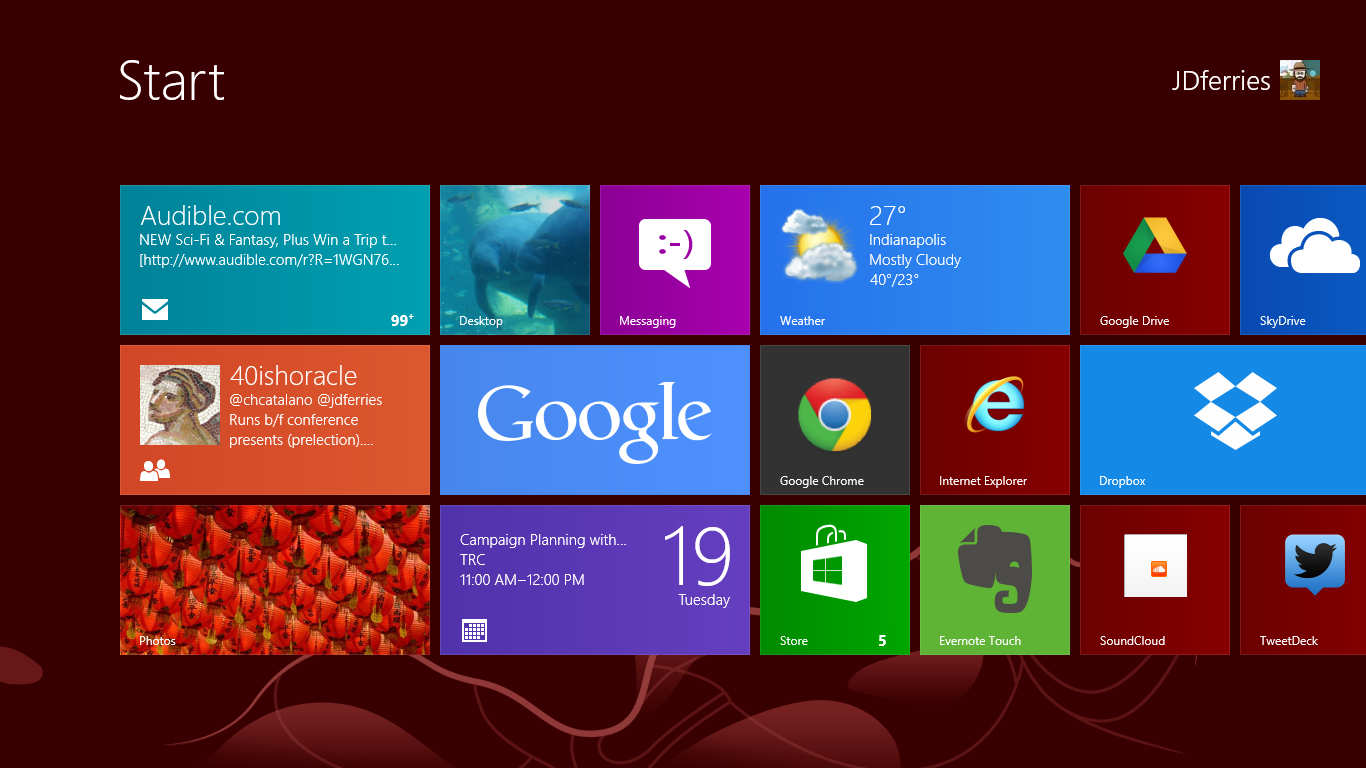
A new "Start"  interface for selecting programs
There has been a lot written about the confusion that is inevitable with the Windows Desktop vs. the Windows RT environment. How will normal human beings every be able to cope? We have a number of our teachers who have requested the Windows 8 upgrade and, I am pleased to report, learning is still taking place.

PD Tip: think of the RT interface as a very fancy START button (this is easy, since one of the ways to access the RT screen is to hold your mouse in the bottom left corner).

From this screen, you can access a variety of Apps and a market place to add more. Some of them, such as the People App, Photo App, and the Mail App are live tiles that rotate with updates of recent posts, pictures, subjects. All of these apps tie-in with major email programs and social networks. In addition to the apps on the RT side, you can create shortcuts for frequent websites and buttons for frequently used programs (I made a group of tiles for the full MS Office, a tile for tweetdeck, etc.)

A press of the desktop app and you are at a classic windows screen complete with file folders, "my documents", all the classic programs, etc. 

The "Killer" Feature: It's Windows - Full Windows - On a Tablet
I cannot stress this enough. You have a full version of Windows. In a package that is as light and portable as a tablet. Need to screencast using camtasia? - you can. Need a heavy duty word processor? - it can be installed. The first night I was using the computer I was getting ready for a hashtag chat and realized that I hadn't looked for a decent twitter app yet. "Oh. Wait. I can just install Tweetdeck!" 

Having worked with students in our 1:1 BYOT environment for almost a year now, the strongest cases of buyer's remorse come from tablet users who love the design but want more power, fuller programs, etc. As I look to the future, I am somewhat reminded of the early days of netbooks. While netbooks started with Linux and Android, and custom software, eventually, Windows became the dominant operating system. There is just something about a full-feature OS that is part of a regular workflow, be it for a student or teacher. Add to this the ability to break out of an app walled-garden and install full versions of software and you have a lot of potential. I saw jaws drop when teachers noticed that i was taking attendance on our windows-only web-based gradebook from a tablet.

...But it's a Tablet - A very early Tablet
There is an incubation period with all tablets. When the iPad debuted, it was months before people really started to figure out what to do with the real-estate. When I bought my first Android phone (a Nextel phone that was still using Cupcake while all of my friends were eating Froyo). I remember thinking that it had 80% of what I was looking for on a phone but was nowhere near the maturity that I had imagined.

A big finger must for non-touch apps
Switching from a Nexus 7 (running Jellybean) to the Windows RT side, I am forced back into the nascent incubation stage where developers and manufacturer are waiting to see if the product is worth the investment.

Up until last week, there was no Twitter app for the Windows RT side of the tablet. While it was wonderful being able to install tweetdeck, the interface is not optimized for touch. This meant either using the keyboard (not bad for chats, but annoying for quick tweets) or constantly trying to use my finger to scroll up by aiming for that way-too-thin scroll bar (it was frustrating enough that I bought a Wacom Bamboo pen - that is a handy little device).

I was constantly running into things that were either not-ready-for-primetime (the evernote app, while present has a very constrained feel compared to the more mature apps on the other mobile platforms) or non-existent (a quick photo editor, messenger app such as gtalk or Kik, Instagram, Pinterest, good RSS reader, etc.). Some of this is a result of market issues - Google is playing coy with the interface, creating a search app and a chrome browser, but not RT versions of other major products. Part of this is the wait-and-see. Regardless, for those used to full feature tablets on either side of the ShinyFruit-CuteRobot divide, they will have some frustration.

Design - It's All about the Use Case
In some ways, everything about the VivoTab that I liked in Florida is absolutely dead-on. It is light and thin and easy to hold and feels very natural in my hand. It is as comfortable as any 10" tablet when I fire up the Comixology App and settle in to see how Batman reacts to the death of Robin (spoiler alert: not well).

There is not comfortable way to do this
But the devil, particularly in design, is in the details. A primary use case for me is to take notes and live-tweet during presentations, keynotes, meetings, etc. I can comfortably do this on my chromebook and on my transformer prime. It is nearly impossible for me to do this comfortably on the VivoTab. There is a minimum amount of surface area required for a device to rest comfortably on a lap. The Microsoft Surface pulls this off by using a kickstand and a magnetic attachment to the keyboard (we tried it, MS naysayers). Because the VivoTab keyboard does not attach to the device, you have very little surface area with which to work. So you end up using the onscreen keyboard (which is not bad, but its no SwiftKey) or you end up with some awkward positioning (see photo).

My best #FETC Swag - Avid AE-36
One presumed must-have in a Windows computer is a USB port. I was surprised when I went to start a Google+ Hangout that there is no full USB port, thus no USB headphones and no wireless mouse with micro-USB dongle -- both things that I would have made part of my regular use case. Luckily, my Avid headphones (another #FETC find) worked great by maximizing the Input/Output Combo port work like a charm.

Final Thoughts -- The Race is On
oh so portable. Keyboard
magnetically stored inside cover
I think that many parents and students, given the choice between a mobile tablet OS and the potential of a full-function machine will find full-Windows 8 tablets very appealing. While they will have to be careful to think through design and power choices (for example, ASUS is about to release a larger VivoTab that will have a high-res screen, a keyboard identical to the Transformer (with spare battery and full attachment), and a digitzing stylus to boot, there is something very appealing about having one device that does it all.

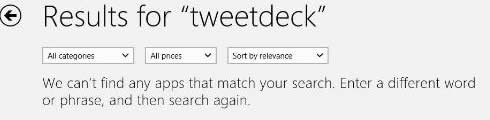
But essential to the tablet experience will be the tablet-side of the OS, namely RT. While it is wonderful to be able to open a full OS and have programs on there that I cannot access in iOS or Android, sometimes a user just wants a tablet...and a tablet is only as good as its apps. All too often, there are no results or, even worse, 3rd party crap-ware that claims to do that which it does not do (there are SO many "instragram viewers" that just link to the website). Without a satisfying tablet experience (particularly as so many people have not had a good app experience from Google&Co. or Apple), the Windows 8 advantage will be overshadowed by dissatisfaction.
I started to dread the "no apps" screen

So I see this as a race. Can Microsoft entice developers and upgrade the RT experience fast enough to be comparable with its competitors? If it can, the current "full OS experience" advantage is a huge boost, particularly if the prices stay competitive. But the pressure is on.
  • Because each day, more and more people are realizing that a "tablet" experience, while limited, can fulfill most of their day-to-day needs.
  • Because the ChromeOS experiment is bearing fruit and the winds of change are forecast the merging of ChromeOS with Android (oooh a chromeOS tablet).
  • Because the not-so-hidden cost of a full OS is the price of programs (Office and Camtasia are wonderful, but they are not a $1.99 in the App Store). Consumer realize this.
For schools and educators and students, these products have the potential to be very appealing. But I believe that the current RT/App experience is enough of a drawback that it does not make up for the ultraportability of the form factor.

And if you are curious, I am glad to be back on my Chromebook
(and carrying my nexus 7 for tablet needs).

Have other questions? Different experiences or thoughts? Share them down below or hit me up on social media -- I'm around :)


Friday, March 15, 2013

In Memoriam: Google Reader -- Why This Matters to Digital Citizenship

Note: The top half of this will be about Google Reader -- the best product that few people new about. Feel free to ignore it. The bottom half will tie this product and the philosophy behind it to Digital Citizenship and Information Literacy. If you are a non-tech Educator, skip to the picture of the three girls.

So Long and Thx for all the Well-Organized, Pre-Selected Push News

If you were reading any blogs about...well almost anything or on social media...just about any of them. You probably heard that, as part of its Spring Cleaning Project, Google was putting the nail in the coffin of a service called Google Reader.

The reason that the cry was so loud, in part, is because so many of the non-traditional news sources (blogs, website reporters, active tweeters, etc.) used Google Reader on a daily (and in some cases hourly) basis. The sunsetting of this product will change the way that many of us (myself included) operate as we maneuver through the techno-informatic complex called the modern world.

What is Google Reader?
Google Reader was/is a news aggregator that uses a back end technology called RSS. Many websites, blogs, news agencies have the RSS symbol (seen in the picture) on their site. If you click that button, you will be given the opportunity to "subscribe" to the information on that site. This subscription is collected and available to you in an RSS Reader which can be found on the web or on phones, etc.

The reason the reader was so popular was because it did what it was designed to do very well. It delivered subscriptions in a clean format that could be sorted by subscription or by recency. It synced between online and mobile. It did not inundate the reader with too many advertisements, nor did it get overly complicated with graphics or flashy (or HTML5-y) formatting tricks.

Why Shut It Down?
Google reader (and RSS in general) is a quirky entity on the internet. For those people who use it, it becomes essential. It is a way to quickly filter information because you, as a user, have pre-determined that the content has some value.
This NSFW (language) post went up hours
after the announcement. May be worth a Google.
From a Social Studies teacher: What am I supposed to do? That is how I read all of my blogs. It is how I get new ideas for the class, news to share, commentary. This is miserable. What is next?
From Hitler: What? I am supposed to rely on getting my news from what Stalin retweets? (see photo)
 Conversation with my wife:
+Elizabeth Ferries-Rowe (@wishbabydoc): I don't know what that is
Me: When you wake up in the morning what is the first thing you look at?
+Elizabeth Ferries-Rowe: Facebook.
Me: For me, it is reader. It tells me what happened that was worth knowing overnight.

...and that is ultimately the issue. Google's spring cleaning focuses on eliminating products that don't fit its core mission components -- Search, Social, and ...something else that I am drawing a blank on. Now, it could be argued (and has been on a lot of blogs) that when Google refocused the "Sharing" from a broad choice down to Google+ that their insular vision caused a lot of people to drop the service. It could be argued (and also has been) that this is yet another example of Google backing away from its promise to "not be evil". Some see it as a problem with the Google-as-Free model, offering to pay money toward the service so many rely upon.

I signed the petition, but I don't think it will do much good. Google made its choice. Here is why I think it is the wrong one:

InfoWhelm, #DigCit, and the Need for New Methods of Information Acquisition

The next gen of Digital Learners will need to Find & Filter info
When Brebeuf Jesuit revamped its curriculum from Computer Applications to Digital Citizenship (a move now being adopted, at least in name, by the rest of the State of Indiana #nocredit), one of the areas that was important to consider was research. As we delved deeper into this topic, talking to teachers, interview students, looking at research in our curriculum and expectations of colleges, we realized that this was going to be a significant focus of the new curriculum. As with most of our units, there are a lot of goals that branch to a number of areas, but today I want to focus on three issues we uncovered:

1. Data, Data, Everywhere - In 2010, Eric Schmidt, then CEO of Google told an audience at Techonomy that there is more data generated in two days than was produced from the dawn of human history to 2003. IBM notes that 90% of all data available has been created in the last two years alone.

2. Inability for Traditional Filter Mechanisms to Address - Traditionally, people relied on large organizations to filter through the data for reliability, veracity, accuracy, etc. These institutions included the government, academic settings with their peer-review system, and even publishers and editors. But most data is now user generated. Whether it is pictures shared on instagram, tweets of the snark or share variety, or blogs like this one, we publish with no filter.

3. Need for Intelligent Filtering - But at the point that so much data is produced, human beings still have to find a mechanism for sorting through that deluge of information. We need to setup systems and processes that will help us filter that information based on a number of factors, including:

  • Usefulness - does the data help me in my daily life or in achieving long term goals?
  • Accuracy - does the data match my real world experience? Can it be independently verified?
  • Timeliness - is the data relevant now or has the digital ship already sailed?
  • Variety - are there enough different sources of data to avoid falling into traps of confirmation bias or silo thinking?

From a post about setting up RSS filters
These filters are not a part of the natural make-up of a human being. In fact, we are biologically/psychologically programmed to have the opposite reaction to some of this information (we tend to ignore information that does not already fit within our pre-existing belief system; we discount information that goes against immediate bio-feedback).

At the point where we do not have a natural ability to sift through information and the social structures in place are inadequate to the job, we must design new systems. RSS Feeds are one of the most powerful tools for this information-filtering, if the people subscribing do so with deliberation and thought -- and Google Reader was one of the best.

Practically applied -- Teaching Infowhelm and Data Management
It is insanity to expect a student to run through a full cross-referenced search process every time they want to read about a controversial issue or topic of interest to them as an individual or to society at large. But in the age of bias-journalism, government/corporations limiting curriculum to easily testable/gradable items, and infowhelm, students need something to combat the deluge of bad data. Click SUBSCRIBE

As we teach our students the skills of finding accurate, relevant, and useful information, we should also be teaching them a method to collect that data on a regular basis. Once a source has been confirmed useful, it is a source that has a good chance of being useful in the future. Click SUBSCRIBE.

As we teach students to find items that present different viewpoints on the world (by finding sources that go against our natural inclinations, discovering writers and reporters from outside our geographic/cultural bubbles, or by finding snarky bloggers who make our blood boil), we should make those viewpoints part of our daily intake of information, if for no other reason than to know the perspective of those who disagree with us. Click SUBSCRIBE.

Why not Social Media?

Social Media Aggregators serve a different function
In class, we work with our students to have them identify their primary sources of information. A growing number of teenagers cite social media as their number one source of news. But relying on your social media circle has two negative #digcit impacts.

  • First, it adds a layer of choice between the user and the information that is outside the user's control. You are not receiving information because has been pre-screened as reliable or relevant or useful (at least not be you). You are receiving information because it meant some criteria that was relevant to whoever decided to share it. Not good.
  • Second, it is almost guaranteed to lack any form of counter viewpoint since we are not likely to follow/friend those with whom we fundamentally disagree. While we can intellectually view material with which we disagree and evaluate it for truth and accuracy, we don't necessarily want that in our social feed, so we avoid it.
  • Finally, our social feeds are SOCIAL. Although I am a huge advocate for social media for its connective and professional development potential, the use of it as a news aggregator gets diluted by the barrage of snark, hashtags, LOLcats, and Hitler-throwing-a-fit videos.
I am sad to see Google Reader go. I have begun to search for alternatives and have been disappointed in the bells and whistles that have been added, usually in the name of "making it more social" or "adding visual appeal". 


But I am also sad because I think of Google as a partner in the #digcit world. Through gmail, google docs, and drive, they have done a lot to empower the individual and close the gap that the Digital Divide throws at our students (granted at the cost of a little/lot of privacy). When they made this decision, they decided to remove an effective tool against information glut and overload. They decided to separate the core functionality of SEARCH from the parallel human need to SORT. Rather than close down the service, I would have hoped they would have made its use a key part of their educational drive.

So, Thank you, Google Reader. My mornings, mid mornings, early afternoons, just-before-leaving-for-work, standing in line, and late nights won't be the same without you.

(You have a few months left. Go ahead. Click SUBSCRIBE).

Monday, March 11, 2013

#Flipclass in an Ignatian Context

Last week, the @40ishoracle and I along with two teachers got to visit one of our fellow Jesuit schools to talk about creating #edtech friendly environments. The keynote was a hybrid of our "Why we went BYOT" combined with a lot of the reflections from last week's blogpost "10 Rules for an #Edtech Department"

One of the breakout sessions that I was asked to give was on the flipped classroom. I will expand the presentation a little more this week (fill in some of the words that I used), but I have had some requests to post the slides, so here you go.

The presentation was a lightning round break-out (20 minutes total with at least 5 minutes reserved for questions), so the focus of the presentation is the reason to consider #flipclass in a Jesuit school -- namely, how does #flipclass support the Jesuit mission of education.

Elements of Jesuit/Ignatian Pedagogy that I focused on were:

  • Understanding Student Context as an element of education
  • Providing time and space for actual learning experiences (now with teacher availability)
  • Providing time for reflection on that experience as a part of authentic learning
More later...

Note: Information in Pink-Boxes is an attempt to capture the spoken content