Showing posts with label flipclass. Show all posts

Monday, March 11, 2013

#Flipclass in an Ignatian Context

Last week, the @40ishoracle and I along with two teachers got to visit one of our fellow Jesuit schools to talk about creating #edtech friendly environments. The keynote was a hybrid of our "Why we went BYOT" combined with a lot of the reflections from last week's blogpost "10 Rules for an #Edtech Department"

One of the breakout sessions that I was asked to give was on the flipped classroom. I will expand the presentation a little more this week (fill in some of the words that I used), but I have had some requests to post the slides, so here you go.

The presentation was a lightning round break-out (20 minutes total with at least 5 minutes reserved for questions), so the focus of the presentation is the reason to consider #flipclass in a Jesuit school -- namely, how does #flipclass support the Jesuit mission of education.

Elements of Jesuit/Ignatian Pedagogy that I focused on were:

  • Understanding Student Context as an element of education
  • Providing time and space for actual learning experiences (now with teacher availability)
  • Providing time for reflection on that experience as a part of authentic learning
More later...

Note: Information in Pink-Boxes is an attempt to capture the spoken content

Thursday, May 24, 2012

Practically Applied: A Month of Creation in #digcit

As educators, we need to bring back the curiosity that is
natural early in childhood. Unlearning the routines may help
One of the struggles that I have had teaching computer classes and even adult professional development over the years is the artificial nature of the exercise. While there are a few notable exceptions and tried & true lessons, the teaching of computers is typically taught as a series of artificial "problems" and walk-through solutions. Students for the most part recognize this and go through the motions to a greater or lesser extent depending on how much they value their grades.

Thus, when we decided to recast the curriculum for Computer Applications as a course in Digital Citizenship (#digccit) based heavily on the ISTE National Education Technology Standards for Students, one of our implicit goals was to make the student experience more real and more relevant. We had some ideas on how to do this: let students drive the agenda within the NETS forward through co-planning the areas to be covered, create a hands-on environment with real experiences whenever possible, integrate the students' own technology into the course, and make connections between the skills and content in the class and its application outside of the course.

The Rough Map for #digcit. The teacher resource room
has two large white boards for planning -- #win
But despite this ambition, when you frame a course based on themes like social media identity awareness and effective communication using technology...you end up with a lot more time in the semester than when you are teaching a series of push-button steps at the pace of your slowest learners. (Note: I credit the individualization that #flipclass affords me for a lot of this added time as well)

So we made the decision to step back even further...and give the last month of class to the students.

Context: 

Brebeuf Jesuit runs a modified-modular schedule. In practice, this means that in a typical five-day week, my class will be 4 times: 2 40-minute periods and 2-one hour periods with a one day break (plus weekends).

The course has built-in discussion time where students bring in articles on technology trends, news, or events that they have discovered and share with the class. The ultimate goal of this portion of the project is to give student an opportunity to analyze claims and evidence made in articles as part of the information literacy practice. In practical terms, it means that one day a week becomes "discussion" day.

Thus we are looking at a 12 days for complete student control:

Students have been operating in a flipped-classroom environment, thus they are used to operating with some level of independence during the class as the assignments and context are given the night before and projects and work time are used in class with the teacher giving most guidance 1-on-1.

Experience:

Students were given a review on the elements of #digcit and the NETS-S. They were walked through a reflection of the types of activities and experiences they had encountered for the last semester. They were encouraged to identify the "lights and shadows" of the semester.  They were then told that this reflection should serve as the lead in to their next assignment: The Pitch

The Pitch: Students were asked to write a memo explaining a final project. The project should deepen their understanding of some portion of the themes covered before. If it used similar tools, they should be enriching the use, exploring new ways or techniques.

Students were also encouraged to create workflow timelines for how they would use the class. These timelines were to incorporate conversations with teachers from other disciplines, so that if there were integration activities in other classes, the Computer Science classroom became the instructional lab complete with brainstorming partners and guidance in all-things-geeky.

When it became clear he needed two hands...
...a truer collaboration was created.

The operations of the day mirrored the conduct of the #flipclass. Students worked independently, but often shared work that they were doing with others:
Struggling to make magic with MotionPaths

  • One student helped another film his step-by-steps for solving a Rubik's cube. These clips were edited and tied into an instructional website complete with diagrams created using AVIARY and GoogleDraw.
  • The entire class would occasionally stop and stare at the student who decided to test the limits of PowerPoint MotionPaths.
  • Another student, struggling to build an interactive game, got help from another who used Photoshop to tweak the shading, lighting, and perspective of game elements.
Check-ins were made daily with the teacher. As necessary, the focus was drawn back to the student-created objectives and the identified connection to a standard or element of #digcit. Very little time was spent off task for almost all students. Students who were consistently off task began to panic as the final project deadline drew closer.

Reflection:

At the end of the day, students were comfortably drawing applications from work they completed in class to the standards and norms of digital citizens in an authentic way. That alone justifies the time spent.

Things to improve: 

Putting Teachers in the Loop: Teachers in other areas were not prepared to have students come to them with a month to go saying "will we have any opportunity to integrate technology into our assessments? I need it for my computer class". Some of them were actually pretty upset, as if we were sitting in judgement. So, what was originally another assessment opportunity, became a "take the time if you need it..we'll be here to help."

Incorporating Language: The focus on #digcit and NETS-S, while there from the inception, was not an explicit part of the language of the classroom until late in the semester. It felt tacked on to the project by some students and took more discussion than necessary to draw the themes through all the previous work after the fact.

Reflections: Increasing the number of formal check-ins (written) as part of the ongoing reflection might help improve the overall quality of work. What was fascinating was that, as expected, some students were aiming for the minimum quality to get X-grade. But since there was no real clear rubric (beyond -- enrich what you have done previously, connect it to a standard you care about, be excellent) then the students kept tweaking and improving based on the quality of work they were seeing from other in the room. Some projects were completed very early but went through three or four informal drafts!

Adaptation and Struggle: There is some struggle with time and...well...struggle. It is not uncommon in this environment for students to hit roadblocks and the need to walk away, do more research, talk through the issue. For someone used to working in technology or any environment that is not mechanical repetition, this is the essence of value. But our students don't know that. As one student put it in her final reflection:
"I would have taken more time to outline how I was going to make the game. I had a lot of "malfunctions" throughout that it took me a little while to figure out what the problem was and then how to fix it. If I had planned better and worked more in an order some of the problems could have been avoided."
It is difficult to explain to a student who is not used to this environment that the struggle cannot likley be planned away and that the results from it are of a better quality, from a learning perspective, than having an experience with no "malfunctions" at all.

Achievement Unlocked: We needed to build in time to showcase the work of the students who worked right up to the deadline.


In the end, this may have been one of the most useful twelve days of the year. The projects had ownership. The standards were a natural part of the learning process and not an afterthought on an evaluation form. The creativity was inspiring. And all it took was handing control of the class over to a bunch of Freshman.

Creativity = Freedom within Structure*

This final project, created by a student who self-describes as "struggling" with the final project,
uses over 30 photos, some drawing, lots of filters...and a touch of creativity. 

*You should have seen the Final Essay :-)

Monday, May 7, 2012

What BYOT Looks Like: Computer Science Workflow

If you want to see more of these, click on the Pinterest board to the side (or on the pic). I just really liked this one. It was created using @aviary and Google drive and drawing entirely on a Chromebook #nothingbutweb


Source: Uploaded by user via JD on Pinterest

Monday, April 16, 2012

Practically Applied: Digital Media Project -- Criticism and Creation

This is a new type of blog post that I am working on, a variation on the #FLIPCLASS DIARY theme where I am attempting to give some technology integration lessons in a simple format, focusing on the overview, applications used, and impact on the lesson.

In all honesty, i am also trying to avoid doing taxes so I am guaranteed to accomplish that goal at least. As always, love the feedback (here or on social networks) and the Retweets. I am beginning to gauge which blogs are working (Flipclass and BYOT commentary) and which ones don't (3 rants in a week cannibalize on themselves).

Creating a Multimedia Presentation - Part I
Objective: Students will create a multimedia presentation that includes narration, text, photographs with the option of adding video and secondary audio.

Primary Tools:
Multimedia creation: iMovie, Windows Movie Maker, PowerPoint, weVideo

Secondary Tools:
Storage and Sharing: Box, Dropbox, Google Docs
Audio Capture: Soundcloud, Audacity, PowerPoint
Picture Editing: Picsay Pro, Skitch, Google Docs Drawing, PowerPoint

Classroom Applications and tools:
Todaysmeet.com - Backchannel
Google forms - Group assignment and prelection
Post-it paper and markers

Prelection and Context Setting: Preview and Day 1
[Note: my favorite part of this lesson]

Overview: many of our students come into highschool with a pretty decent formal or informal ability to create multimedia production in either PowerPoint or one of the basic movie software programs. What seems to be missing is the ability to think about the projects in terms of quality, achievement of message, or goals beyond completion.

Students were assigned to read the Isaac Asimov Essay, "The Relativity of Wrong". Its a great essay for high school students and has some nice things to say about the state of assessment in education. (the copyright of this is still bothering me, but it is out there so...)

Today's meet provides instant backchanneling
for live discussion
We created a backchannel using Today's Meet. I love backchannels so much more than clickers. Backchannels empower students to give more than a fill in the blank response and give them the opportunity to engage withe each other as well.

a few pointed reading check questions were asked to start things off:

  • What is the overall point of the essay? What does the author want you to come away with?
  • What is one description, example, or point that is made that struck you as insightful or interesting?
This puts students into the mode of responding and gets the neurons firing. It also served as a setup for the next section. 

Students then watched a YouTube video of "Relativity of Wrong" created by a fan of the essay. I was very explicit to explain to the students that i thought there were some things executed very well and some things that need a lot of work.

As they watched the video, they were to fill in the back channel with observations about the presentation. They were to focus on what was executed well and what needed work to improve it. Through the course of the backchannel (11 pages long when printed) the students pointed out on their own, elements that would have made any English teacher...well, any teacher...proud:
  • Too much text and the screen
  • Monotone voice
  • Could use some animation
  • Good use of photos to underscore ideas
After the backchannel, we reflected on the ideas presented. Students developed their own set of working guidelines for making a presentation (Dos and Don'ts). From a social media/digital citizenship side, the students were able to criticize without personalizing and even complimented others on good points.

Homework: Find an essay, piece of writing, portion of book, etc that you will use to make a five minute multimedia presentation from. 

Preparation and Storyboarding: Day 2-3

The next day, students created small group and discussed each individual idea for its pros and cons. Many of the elements identified the day before came up in the discussions (practical reinforcement) and students began to discuss their plans. By the end of the day, each group had filled out a GoogleFORM (survey) that identified groups, topics, initial themes and focus points.

One of the more popular tools we demo is a
mobile App for ANDROID called Picsay Pro
#FLIP video: Preparation That night, students watched a flip video that gave them an overview of non-linear video creation (this is the most common type of video/multimedia, used in iMovie and Windows Movie Maker among others). The video also previewed the use of a number of tools that would be good options for adding captions to photos, simple animations, and sharing the files that students would be collecting for their projects ("the bin").*

*NOTE: this is key to a #BYOT environment. It is not about teaching the specific buttons to push. it is giving the overview that allows student the time and the space to experiment with tools.

In-class: Storyboarding After a brief demonstration that walked students through the basics of storyboarding, they were off to work on their own. I was able to meet with each group at least three times over the course of the next day and a half of class. During these discussions we talked about advantages and disadvantages of specific tools, questioned the level of specificity on some of the boards (and how the lack of detail might cause more work later on).
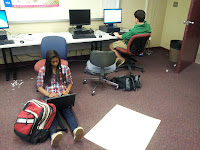
Again, the focus was not on the specific tools that were being used. Most groups had the basics down. And for students who were struggling with a specific technique, it was much simpler and more effective to show that one students (and any others interested in learning a specific process).

By the end of Day 3: most groups had completed their preliminary Bins of material to include. A number of students had begun working on captions and title slides. One group had decided, based on the types of transitions and animations that they were planning, that they would be better off using PowerPoint, with its numerous transition and motion effects rather than iMovie which was more limited when dealing with 5 simultaneous effects on 5 different photos.
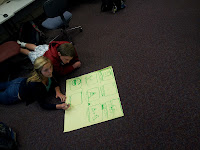
Over the weekend, no homework was assigned, but a number of groups had created a GoogleDoc that was shared in order to write voice-over scripts and hash out any details they needed before production began in earnest.

Reflection:
So far, I have been very pleased with this assignment. It has allowed the students to focus on the objectives of the project (creating an effective multimedia presentation) by empowering them to use the tools with which they are most comfortable.

Beyond this, they have found a benefit in planning, preparing ahead of time, and working collaboratively in real-time and asynchronously.

This week, students will close the loop by reviewing each group's creation for message communication, technique, and overall message -- the same as was done during the prelection exercise.

Please feel free to Like, Comment, Repost, Retweet, +, etc. As always, we are interested in feedback and commentary. I would love to know if this type of post is useful to my tens of followers -- and if you are interested in a part II. :)


Wednesday, March 7, 2012

Abandoning the One Ring -- Breaking out of the Ultimate Platform Mentality

Apologies to Tolkien, but i write what pops into my head...

One for the Dark Lord on his dark throne
In the Land of Mordor  Schools where the Shadows lie.
One Ring Learning Management System to rule them* all, One  Ring Learning Management System to find them,
One  Ring Learning Management System to bring them all and in the darkness bind them
In the Land of   Mordor Schools  where the Shadows lie.


*Them = Teachers, Students, undersea Sponges, etc.


5 minutes long but oh so nice for GenX memories

Searching for the Miracle
As Brebeuf Jesuit has been moving to its 1:1 BYOT model, part of the internal preparation for classroom teachers has been meeting with individual departments to begin discussing what the classroom could look like next year. There have been many positive implementations during this pilot year and it has been exciting to be able to share what some of these implementations look like (see http://40ishoraclereflections.blogspot.com) for some examples.


The two concerns that have been brought up most commonly for teachers who have not already embraced BYOT are twofold: 1. how are we going to be assessed as educators for proper implementation (have i mentioned the assessment culture that is killing me recently? great post from the Educational Technology Guy on this) and 2. what is the TOOL that will make BYOT work beautifully.


I am going to defer to @40ishoracle for assessment. she has dug up some awesome resources that we are adapting. I want to deal with the second issue in today's blog.


What is the TOOL that ties all of the BYOT sparkle into one pretty package?
THERE ISN'T ONE.


Letting it Go
Don't get me wrong, I love the idea of a one-stop shop that does all of the educational things that I want my students to experience and is aware enough that it continuously improves as technology and users evolve. I have heard promises from Blackboard (cross platform! lots of options! but the gradebook doesn't take attendance), EdLine (now a part of Blackboard...good on the basics, slow to innovate), Google (I am a fan)...I even remember sitting at ISTE over a decade ago and watching Steve Jobs keynote about the Apple School. I get excited each time. I get disappointed each time.

and then I stopped.

I stopped expecting one company to have all the answers.
I stopped looking for the company that would integrate new methodology into their behemoth
I just stopped.

and when i stopped looking for the universal solution, I realized that I was now on very comfortable ground. 

As a teacher and a technician, I am used to asking the question: "how do i best do X?" and searching and asking and experimenting until I find the answer. This is not just a good practice, this is an essential behavioral skill that should be developed in our students. Unless we want our children and students to be at the mercy of 1-3 major technology companies decisions' about what is good for them, they need to know how to:
  1.  Identify their learning need
  2. Assess tools that could fill that need
  3. Use the tools appropriately.
This might fall into one of those "If you learn nothing else, learn this" categories.

Need storage space? use dropbox or box.net or google docs or...
Need to create a presentation? keynote or powerpoint or google docs or...
Need to collaborate on a paper?
Need to change a video codec?
Need to...

The Flip Side
A complaint that we have had, and I think it is legitimate takes two forms:
From students: Depending on the teacher, I have assignments in multiple places and they expect me to keep track of it all...
From administrators: how can we keep up with the teachers (track progress, view content, gather data) when there are so many different tools being used?

I think for the benefit of school personnel, teachers, and students, there should be one central jumping-off point. The "if I forget everything else, I can go here". This is our Learning Management System: 
  • Each class has a page. 
  • Each page has Grade updates, and places for  links, news items, notes, etc. 
  • But from there teachers can link to an educational blog (teacher or student maintained), a plagiarism monitoring system, a collaborative document creation site, a site for my dream #flipclass software (still hasn't been made...but progress!) 
Develop in students the ability to comfortably adapt to different technologies. Develop in teachers the ability to articulately explain the advantages of one system over another (this demonstration of critical choice is part of the student learning process).

If it is necessary for administrators to track the data through various tools to create charts and graphs, then that is the next field for educational technology development. Do not force teachers and students to use inadequate tools because INSERT-EDUCATION-COMPANY-HERE has not figured out how to write a decent API yet.

In short, let's give up on the ONE RING and put it back into fantasy where it belongs.


Friday, January 27, 2012

A #flipclass diary: Adding a little BYOT Goodness


Someone on FB asked me about this line from the #flipclass diary 
blog, so i thought i would make it into an entry: “spent the next day refining skills and learning the practicalities of codecs and embedding video”

I am not sure how to classify this one. It is a little bit of constructivist education, it was made possible by the #flipclass format that allowed students to move at a faster pace in the classroom, and it is a great shot of #BYOT in action.

The students were using the Microsoft Training Courses to learn some of the features of Office 2010. We have started using these as supplemental material since it allows students to self-pace and gives them another learning option. Almost all of the students skipped the first few lessons (create a slide, add text, etc.). At one point, midway through the class, almost every student was working on adding videos.

Student A: Where do I get some videos to add? You Tube?

Student B: No, youtube is different you need a file.

Student A: Mr. Ferries-Rowe, where could we get video?

Me: I don’t know. Where could you get video from? If only there were some device in this classroom that could take video. What a wonderful world that would be.

Student C: (picking up on my sarcasm): Ooh! my phone can capture video!
Student D: Mine too!
Student E: Oh Yeah!
Student F: Siri, can you take video? [editor’s note: there is no student F]

(pause for film goodness)

Student A: ok, now what?

Me: you tell me.

Student A: I have video but it has to be on this computer in order to put it in the PowerPoint.

Me: True.

Student A: I don’t have my cord

Me: If only there were  a convenient way to transfer files from one device to another...as if through a cloud.

Student C: You could email it.
Student G: No, the flip video. He talked about Dropbox

Student A: I have that app on my phone!

Student H: there is an app?
Student I: Yeah, I have it to...

(Pause for App downloading, account registration, etc.)
(Pause for Transferring files to dropbox and retrieving it from the web)
(Pause while student inserts video to power point)


[Editor’s note: see how much pausing there is? it’s awesome]

Student H: it worked!
Student K: mine too!

Student A (poor student A): Mine says there is a codec error

Me: What’s a codec?

Student I-don’t-remember: Instructions. Like a language. (someone watched the flip)

Student C: We need a program to translate it. I use AVI
Me: but the mean techs at school won’t let you install programs. Next?
Student C: is there a web-based translator?


By the end of the class, students had real-world problem solving experience. Understood (to some degree) the issues presented by different codecs and (to a greater degree) how to work around them. They had used a variety of tools, cloud-based and personal, to enhance presentations, and worked collaboratively to solve problems.

That’s a good day.

Wednesday, January 25, 2012

#flipclass diary: a form-follows-function story


Abstract: Flipped Classrooms rock.


Been taking a week or so off of the blog to finish a #BYOT book chapter with @40ishoracle, get the debate tournament season started and teach a class. It is that class that i wanted to write about today...more of a gush than a rant, so pull out the handkerchiefs, i may get sappy...nah. File this under a continuation of form-follows-function: Designing classes that meet the learning needs of the students.

Context:
Brebeuf Jesuit is a private secondary school that follows the Ignatian Pedagogical Paradigm (you can read a lot more about technology in the context of the IPP in @40ishoracle’s article that was in LEARNING AND LEADING WITH TECHNOLOGY “Give your old-school curriculum a NETS makeover” -- shameless plug...link not available yet).

In this system of education, the emphasis of learning is in...
Reflection (careful consideration and thought) on
Experience (actual activities that the student in which the student has engaged) within a
Context that includes both the student and the subject matter as a foundation.

One of the struggles I have had as an Ignatian educator is balancing a whole lot of foundational context about technology and a wide variety of foundational context from students.
  • Have you had the student who sits in your class bored over the lecture because they already know the material (and you know that they know)?
  • Have you, at the same time, attempted to teach other students who struggle with the material because they have no frame of reference in which it makes sense?
  • Felt hampered by the sheer amount of material you had to cover to get students ready to do an activity?
  • Felt inadequate to the task because all of the really good questions that had to be set aside because it was time to move on to the next lesson?
This was my experience as I prepared to teach a revised computer science curriculum that would emphasize the skills and characteristics of a “Digital Citizen” and de-emphasize the push-button Microsoft curriculum. I decided that the best way to do this was a flipped classroom.


Experience:
"The History of Computers" was often a lesson that I presented traditionally. While I created an excellent and engaging lesson (of course) about the history of computers I often found it to be a bore. It was built around "themes" which provided the students a framework other than the passage of time: “Smaller, Faster, but not all that different”; “Getting Connected”, etc. I incorporated activities like making each student a “member” of the original Arpanet so they could experience delivering messages in the early internet. It was about as good a lesson as I could manage given the subject.

As I began to evaluate activities that required live interaction between the teacher and student, I also distinguished between what was necessary content and skills that i would evaluate and what was “fluff” -- I began to re-think the entire lesson. The “themes” were the important content takeaway, not the dates or the terminology. This general ideal could be combined with an introduction to research-as-a-skill and making-effective-presentations-as-a-skill, two subjects on which high school students can always use practice. The lesson began to form and I made the flip:


TraditionalFlip
Introduction of the “themes”LectureVideo Homework
Examples of the themes in historyLecture
  • Keywords given in flip video and on Presentation notes as homework
  • Examples and evidence generated by students in class
Research for PresentationHomework (or “extra” periods of classtime)Classwork the day after the flip
How to make a PresentationLecture with Guided DemonstrationVideo Homework with hands-on experiment module in class
AssessmentMake-a-presentation HomeworkMake-a-presentation in class
In-Class PresentationIn ClassIn Class
* Classtime is in green. Same number of days, different activities.


Students watched the flipped video lesson that night with only a few hiccups. There were “did-you-watch” action steps so that students, after a brief Q&A, began their research in groups (each group given a different time period) on the Themes from the lecture.


It is important to note two things: First, students were not given a full-blown history lecture as video. They were given the themes, a few general “things to look for” and some getting-started keywords. Second, prior to this year, I had never watched students research -- that was the homework AFTER the lecture.

A Few Examples:

Student A: Begins research by opening up internet explorer and Microsoft PowerPoint. After typing in keywords, clicks on the Wikipedia link (first one) and copies the first paragraph into a PowerPoint slide.
Me: Why did you open PowerPoint? that is an odd note-taking vehicle
Student A: you said we were going to do a presentation on this.
Me: What information did you just paste over?
Student A: I don’t know, I just copied it. It’s about one of the keywords you gave us.


Student B: Types into Google: “History of Computers Getting Connected”. Student is frustrated that this does not yield a wikipedia article. When asked to refer to the keywords that she was given as part of the lecture or questions she had developed, she sighs over the difficulty of the assignment.


Student C: Can I use wikipedia?
Me: I don’t know. Is it a valid source?
Student C: Lot’s of teachers hate it. It’s OK, I can use something else (turns around).


Reflection: What a difference a FLIP makes.
My first reaction was just sheer amazement over their (lack of) research skills. But the more i thought about it (multiple sending schools, young students, a class that is not typically research oriented, etc.), this should have been expected. More importantly, it was likely what has always happened, but the traditional format did not afford me the opportunity to see research-in-action. In a flash, I was not frustrated with the poor quality of work from "these kids today...ugh". I was given a clear indication of learning deficiencies that could be illustrated and which could improve research for the long term.


Action:
I made a list of what I had noticed and what proper research techniques would be necessary to address the areas of concern. The next two days were set (they watched a FLIP video preparing for PowerPoint and spent the next day refining skills and learning the practicalities of codecs and embedding video). That night, I assigned another FLIP video.


Their assignment the next day was to try again, with a more focused topic (depth beats breadth on everything except standardized tests). The results were amazing: More focused research, Questions that came from research instead of from the teacher, collaboration in discovery and answering -- all from a ten minute video that addressed the common mistakes that were being made by the class as a whole.

The flipped demo featured a split-screen browser and OneNote
Students watched a live demonstration, starting at a keyword (i used the Commodore 64). They watched as I moved in-demonstration from making questions, doing preliminary research, copying links and pictures, taking notes, forming more questions. Along the way, I was able to address the importance of linking evidence and claim, using notes during research instead of bypassing directly to the presentation, and taking time to think and reformulate new questions.


Evaluation
This is an extension of the form-follow-function in education argument. If I believe in the premise that reflection-on-experience is the place were learning occurs, than it is essential that the teacher be present during the experience for observation, guidance, etc. The passive part (lectures, videos, and to a lesser extent note-taking) is contextual foundation for the learning. The important part to watch is when the neurons are firing in the learner's brain. That is when teaching, even if it is just a nudge in the right direction, is fundamental.
If I were not a fan before, the ability that the #flipclass format affords the teacher in giving a window into the work habits and processes of the students is enough to justify the extra time and effort. The strange thing though, is there is not much more of either.


More on that later...

Wednesday, December 14, 2011

Dreaming Big: The Software I need for my "flipping" classroom


This one has been brewing in my head for awhile which means that it will probably go long, but i think the time has come for educators to start laying out what is necessary to take classrooms from analog to digital...the legislators had their chance and they give us contradictions like creativity-through-standardized-testing. In the spirit of the season, Bah Humbug.

Context: One of the best presentations I saw this year at ICE (Indiana Computer Educators) was a session on FLIPPED CLASSROOMS put on byTroy Cockrum (@tcockrum), Brian Bennett, and Brett Clark (@Mr_Brett_Clark). In this session, they outlined a simple method of teaching that could be considered innovative in some ways and a refinement of good teaching practices in others. Rather than going into details on “what is a flipped classroom” I will refer you to the livebinder @40ishoracle and I have been sending people to this year, my pearltree on the topic or suggest you follow @jonbergmann.

In summary, the #flipclass idea centers around displacing traditional classroom activities, including lecture, to the “homework” timeslot, freeing up that time period for one-to-one check-in, discussion, clarifying, activities, etc. In its simplest form, the teacher becomes available to “help” with homework problems that classically deterred students from doing their work.

This brings me to software: while it is a misconception that numerous flipclass teachers write about to say that it is all about “video taping the lecture”, when you think about the types of activities that can be displaced (reading chapters, listening to lecture, walking through a power point, taking notes), lecture pops to the top of the list in terms of what can be done.

There are a number of software solutions out there for recording screen casts, teacher video, etc. Many of our teachers have experimented with paid (like Camtasia) and free solutions and this is not an analysis of those.

Instead, i became intrigued by thinking about what software would look like if it were specifically designed to help the flipping teacher (i love the adjective wordplay). As is the case with most things, if there is an education need, there are companies who are working to fill it. I got to meet with Senthil Premraj of www.flippedlessons.com. While this company is not yet creating the software that i am about to describe, it was a phenomenal discussion and i encourage people with experience in flipping classrooms to talk to them about what you would like to see.

So here it is...My dream software for supporting the flipped classroom:

  1. Web based (and only web-based): If I have a browser, it should be able to run this software. If I have a webcam or a microphone, it should be able to interface. Test it on a chromebook.
  2. The ability to import, upload, embed from a variety of resources. There are too many effective videos and demonstrations out there for teachers to not have access to them. We are experts in curation, but the mechanism to bring a video into my flipped lesson should be seamless and simple
  3. One Stop Video Creation with simple editing. I do NOT want to export to edit. I want one tool and one screen. So what would this entail?
    1. A simple drag and drop timeline. that can include videos that we have uploaded and embedded, videos that we have created through a webcam.
    2. A separate audio-only timeline for doing voiceovers.
    3. A third timeline for captions, callouts, etc.
    4. Want to win the special prize? give me a fifth timeline to do sideXside or picture-in-picture.
  4. Teacher control: Teachers pace their lectures, display a variety of media, choose when to joke and when to be serious. Canned lessons are bad out of the textbook and bad off the web. Let the educator do the work. (yes, i heard the gasps. I am not a total liberal)
[Part of me understands that i am shooting for the moon here, but this would be the service that, as a school i would pay money for.. Besides, aviary.com already figured this out for web-based podcasting.]

  1. The ability to export the final “movie” product. Teachers should be able to keep the fruit of their efforts even if the school stops paying for the product.
  2. a simple mechanism for giving fair-use copyright credit. we need to be better models of this for our students. (this would be a simple piece to add to the upload/embed dialog. Where did this come from? what date? and then create a credit slide at the tail-end of the “movie” or a credit page that can be clicked on).
So on the teacher interface side, we are looking at a simple layout with timelines, audio/video bins, a callout/caption interface, a question option interface (see below) and some well-designed dialog boxes.

On the student side,

  1. A system for inserting questions as a “listening check” for students. Bonus points if there is a self correcting option and if the teacher can get feedback so he/she knows going into class where students struggled with the lesson the night before.
  2. A “Question” box where students can leave notes and questions for the teacher as they are going through the lecture so that they do not “forget” the questions the next day.
Finally:

  1. Help me demonstrate the value add. Give the administrator statistics on numbers of teachers, numbers of lessons, number of students accessing. I want lots of numbers and data in charts and graphs.
  2. Make the login interface logical and simple. Do not require a class list import or at least give me a variety of options such as a classroom passphrase that is entered after the student logs in.
  3. Keep the cost reasonable. Google Docs is free. Microsoft is becoming affordable. Camtasia costs under $300. Dont price a brilliant product out of the market.

And that is it. 
My dream software. 

If you have already invented, please feel free to call me with a quote. if it hasn't been invented yet and the ideas are useful, toss a little credit to Brebeuf Jesuit, a school for all your flipping needs :). If you make millions, I want to talk to you about a library renovation.

(In all seriousness, i wouldn't be blogging about it if i didn’t want to see this happen. Prove me right, Internet, make the magic happen)